CCNA 1 v7 Modules 16-17: Building and Securing a Small Network Exam Answers
Checkpoint Exam: Building and Securing a Small Network. This comprehensive study guide covers Modules 16-17 of the CCNA1 Introduction to Networks v7.0 (ITN), including network security, SSH, troubleshooting, network design, and device management.
1. Which component is designed to protect against unauthorized communications to and from a computer?
Explanation: Topic 16.3.5 – A firewall protects against unauthorized communications.
2. Which command will block login attempts on RouterA for a period of 30 seconds if there are 2 failed login attempts within 10 seconds?
Explanation: Topic 16.4.3 – The syntax is login block-for seconds attempts attempts within seconds.
3. What is the purpose of the network security accounting function?
Explanation: Topic 16.3.4 – Accounting tracks user actions.
4. What type of attack may involve the use of tools such as nslookup and fping?
Explanation: Topic 16.2.2 – Reconnaissance attacks use tools like nslookup and fping to gather information.
5. Match each weakness with an example. (Not all options are used.)
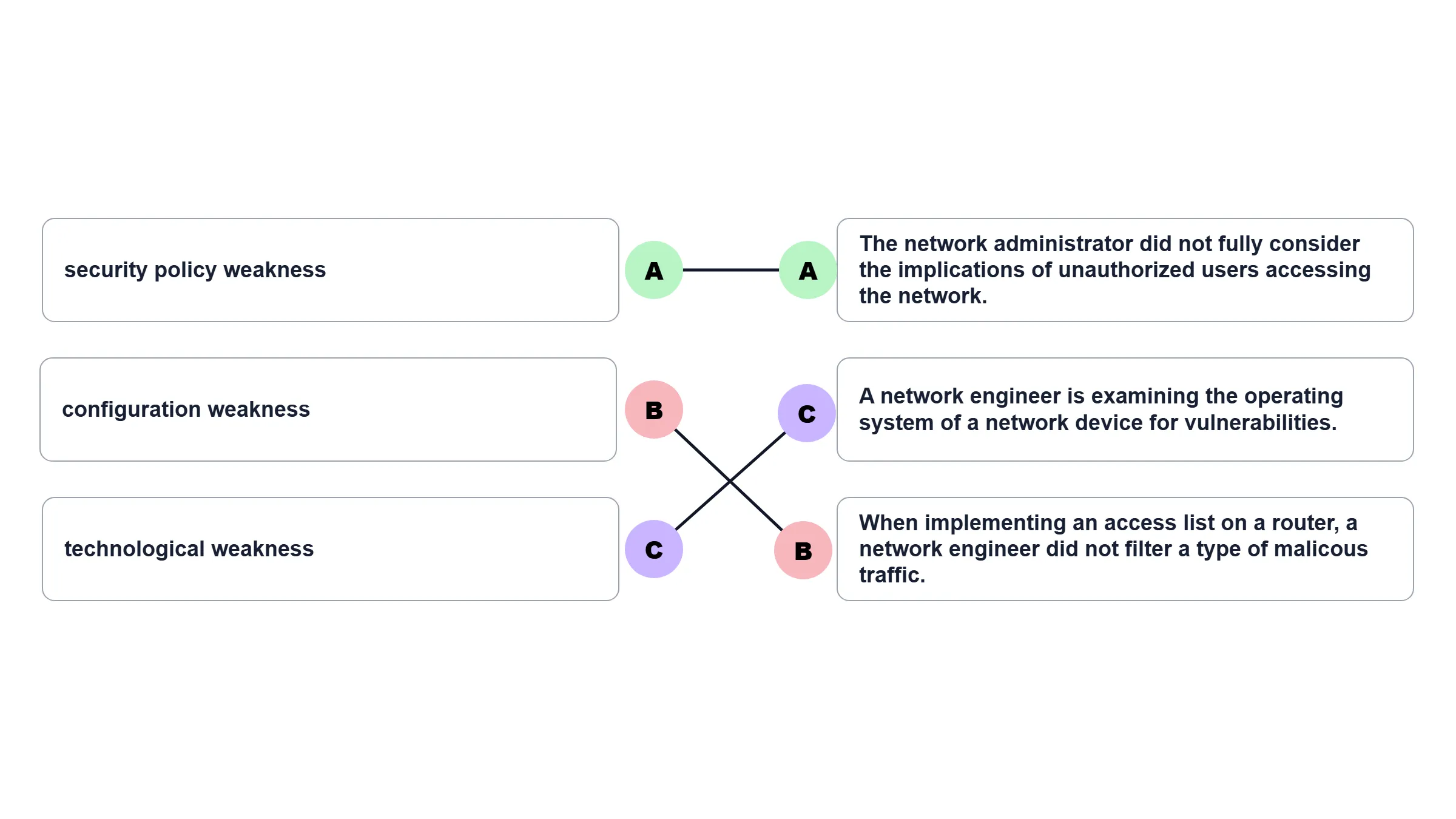
Explanation: Topic 16.1.2 - An employee who is trying to guess the password of another user exemplifies not a weakness but an attack.
| Weakness | Example |
|---|---|
| security policy weakness | The network administrator did not fully consider the implications of unauthorized users accessing the network. |
| configuration weakness | When implementing an access list on a router, a network engineer did not filter a type of malicious traffic. |
| technological weakness | A network engineer is examining the operating system of a network device for vulnerabilities. |
6. Match the type of information security threat to the scenario. (Not all options are used.)
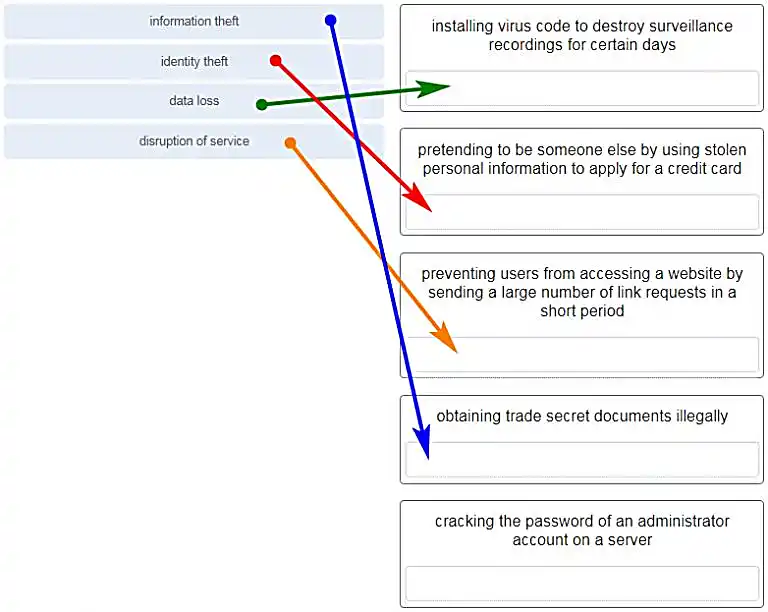
Explanation: Topic 16.1.2 – Common threats: information theft, identity theft, data loss/manipulation, disruption of service.
7. Which example of malicious code would be classified as a Trojan horse?
Explanation: Topic 16.2.1 – A Trojan horse is malicious code that has been written specifically to look like a legitimate program. This is in contrast to a virus, which simply attaches itself to an actual legitimate program. Viruses require manual intervention from a user to spread from one system to another, while a worm is able to spread automatically between systems by exploiting vulnerabilities on those devices.
8. What is the difference between a virus and a worm?
Explanation: Topic 16.2.1 – Worms self-replicate and spread without user intervention.
9. Which attack involves a compromise of data that occurs between two end points?
Explanation: Topic 16.2.3 – A man-in-the-middle attack intercepts data between two endpoints.
10. Which type of attack involves an adversary attempting to gather information about a network to identify vulnerabilities?
Explanation: Topic 16.2.2 – Reconnaissance attacks gather information about network vulnerabilities.
11. Match the description to the type of firewall filtering. (Not all options are used.)
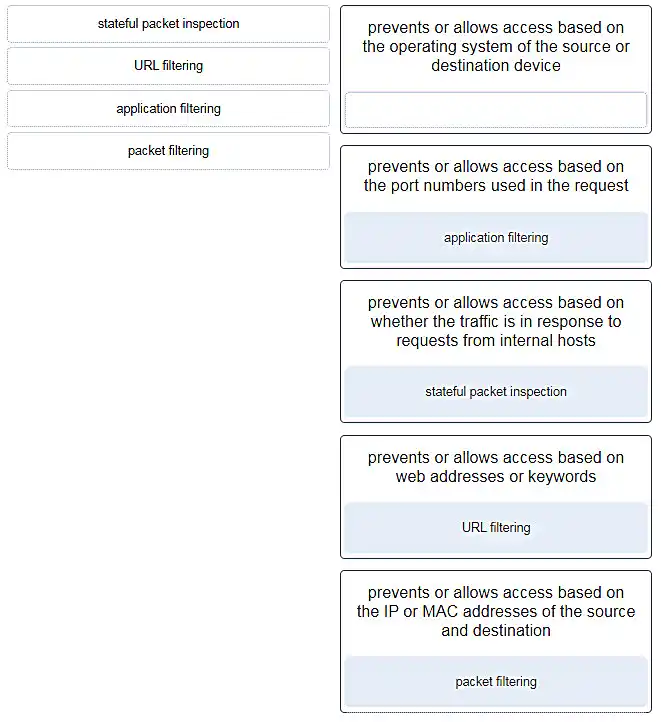
Explanation: Topic 16.3.6 - Stateful packet inspection: Prevents or allows access based on whether the traffic is in response to requests from internal hosts. URL filtering: Prevents or allows access based on web addresses or keywords. Application filtering: Prevents or allows access based on the port numbers used in the request. Packet filtering: Prevents or allows access based on the IP or MAC addresses of the source and destination.
12. What is the purpose of the network security authentication function?
Explanation: Topic 16.3.4 – Authentication, authorization, and accounting are network services collectively known as AAA. Authentication requires users to prove who they are. Authorization determines which resources the user can access. Accounting keeps track of the actions of the user.
13. Which firewall feature is used to ensure that packets coming into a network are legitimate responses to requests initiated from internal hosts?
Explanation: Topic 16.3.6 – Stateful packet inspection on a firewall checks that incoming packets are actually legitimate responses to requests originating from hosts inside the network. Packet filtering can be used to permit or deny access to resources based on IP or MAC address. Application filtering can permit or deny access based on port number. URL filtering is used to permit or deny access based on URL or on keywords.
14. When applied to a router, which command would help mitigate brute-force password attacks against the router?
Explanation: Topic 16.4.3 – The login block-for command sets a limit on the maximum number of failed login attempts allowed within a defined period of time. If this limit is exceeded, no further logins are allowed for the specified period of time. This helps to mitigate brute-force password cracking since it will significantly increase the amount of time required to crack a password. The exec-timeout command specifies how long the session can be idle before the user is disconnected. The service password-encryption command encrypts the passwords in the running configuration. The banner motd command displays a message to users who are logging in to the device.
15. Identify the steps needed to configure a switch for SSH. The answer order does not matter. (Not all options are used.)
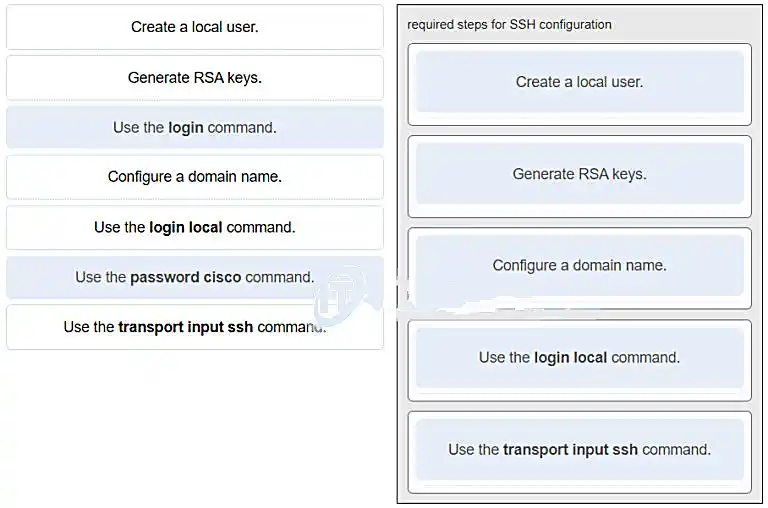
Explanation: Topic 16.4.4 – SSH requires a domain name, RSA keys, and a local user database.
16. What feature of SSH makes it more secure than Telnet for a device management connection?
Explanation: Topic 16.4.4 – Secure Shell (SSH) is a protocol that provides a secure management connection to a remote device. SSH provides security by providing encryption for both authentication (username and password) and the transmitted data. Telnet is a protocol that uses unsecure plaintext transmission. SSH is assigned to TCP port 22 by default. Although this port can be changed in the SSH server configuration, the port is not dynamically changed. SSH does not use IPsec.
17. What is the advantage of using SSH over Telnet?
Explanation: Topic 16.4.4 – SSH provides a secure method for remote access to hosts by encrypting network traffic between the SSH client and remote hosts. Although both Telnet and SSH request authentication before a connection is established, Telnet does not support encryption of login credentials.
18. What is the role of an IPS?
Explanation: Topic 16.3.4 – An intrusion prevention system (IPS) provides real-time detection and blocking of attacks.
19. A user is redesigning a network for a small company and wants to ensure security at a reasonable price. The user deploys a new application-aware firewall with intrusion detection capabilities on the ISP connection. The user installs a second firewall to separate the company network from the public network. Additionally, the user installs an IPS on the internal network of the company. What approach is the user implementing?
Explanation: Topic 16.3.1 – Using multiple defenses at different points creates a layered security approach.
20. What is an accurate description of redundancy?
Explanation: Topic 17.1.4 – Redundancy attempts to remove any single point of failure in a network by using multiple physically cabled paths between switches in the network.
21. A network administrator is upgrading a small business network to give high priority to real-time applications traffic. What two types of network services is the network administrator trying to accommodate? (Choose two.)
Explanation: Topic 17.1.5 – Streaming media, such as video, and voice traffic, are both examples of real-time traffic. Real-time traffic needs higher priority through the network than other types of traffic because it is very sensitive to network delay and latency.
22. What is the purpose of a small company using a protocol analyzer utility to capture network traffic on the network segments where the company is considering a network upgrade?
Explanation: Topic 17.3.2 – An important prerequisite for considering network growth is to understand the type and amount of traffic that is crossing the network as well as the current traffic flow. By using a protocol analyzer in each network segment, the network administrator can document and analyze the network traffic pattern for each segment, which becomes the base in determining the needs and means of the network growth.
23. Refer to the exhibit. An administrator is testing connectivity to a remote device with the IP address 10.1.1.1. What does the output of this command indicate?

Explanation: Topic 17.4.1 – In the output of the ping command, an exclamation mark (!) indicates a response was successfully received, a period (.) indicates that the connection timed out while waiting for a reply, and the letter “U” indicates that a router along the path did not have a route to the destination and sent an ICMP destination unreachable message back to the source.
24. Which method is used to send a ping message specifying the source address for the ping?
Explanation: Topic 17.4.2 – By issuing the ping command without a destination IP address in privileged EXEC mode, the Cisco IOS enters extended ping mode. This allows the user to implement extended commands which include source IP address.
25. A network engineer is analyzing reports from a recently performed network baseline. Which situation would depict a possible latency issue?
Explanation: Topic 17.4.1 – While analyzing historical reports an administrator can compare host-to-host timers from the ping command and depict possible latency issues.
26. Which statement is true about Cisco IOS ping indicators?
Explanation: Topic 17.4.1 – The most common indicators of a ping issued from the Cisco IOS are “!”, “.”, and “U”. The “!” indicates that the ping completed successfully, verifying connectivity at Layer 3. The “.” may indicate that a connectivity problem, routing problem, or device security issue exists along the path and that an ICMP destination unreachable message was not provided. The “U” indicates that a router along the path may not have had a route to the destination address, and that it responded with an ICMP unreachable message.
27. A user reports a lack of network connectivity. The technician takes control of the user machine and attempts to ping other computers on the network and these pings fail. The technician pings the default gateway and that also fails. What can be determined for sure by the results of these tests?
Explanation: Topic 17.4.1 – In networks today, a failed ping could mean that the other devices on the network are blocking pings. Further investigation such as checking network connectivity from other devices on the same network is warranted.
28. A network technician issues the C:> tracert -6 www.cisco.com command on a Windows PC. What is the purpose of the -6 command option?
Explanation: Topic 17.4.3 – The -6 option in the command C:> tracert -6 www.cisco.com is used to force the trace to use IPv6.
29. Why would a network administrator use the tracert utility?
Explanation: Topic 17.4.3 – The tracert utility is used to identify the path a packet takes from source to destination. Tracert is commonly used when packets are dropped or not reaching a specific destination.
30. A ping fails when performed from router R1 to directly connected router R2. The network administrator then proceeds to issue the show cdp neighbors command. Why would the network administrator issue this command if the ping failed between the two routers?
Explanation: Topic 17.5.6 – The show cdp neighbors command can be used to prove that Layer 1 and Layer 2 connectivity exists between two Cisco devices. For example, if two devices have duplicate IP addresses, a ping between the devices will fail, but the output of show cdp neighbors will be successful. The show cdp neighbors detail could be used to verify the IP address of the directly connected device in case the same IP address is assigned to the two routers.
31. A network engineer is troubleshooting connectivity issues among interconnected Cisco routers and switches. Which command should the engineer use to find the IP address information, host name, and IOS version of neighboring network devices?
Explanation: Topic 17.5.6 – The show cdp neighbors detail command reveals much information about neighboring Cisco devices, including the IP address, the capabilities, host name, and IOS version. The show interfaces and show version commands display information about the local device.
32. What information about a Cisco router can be verified using the show version command?
Explanation: Topic 17.5.5 – The value of the configuration register can be verified with the show version command.
33. Which command should be used on a Cisco router or switch to allow log messages to be displayed on remotely connected sessions using Telnet or SSH?
Explanation: Topic 17.6.4 – The terminal monitor command is very important to use when log messages appear. Log messages appear by default when a user is directly consoled into a Cisco device, but require the terminal monitor command to be entered when a user is accessing a network device remotely.
34. Which command can an administrator issue on a Cisco router to send debug messages to the vty lines?
Explanation: Topic 17.6.4 – Debug messages, like other IOS log messages, are sent to the console line by default. Sending these messages to the terminal lines requires the terminal monitor command.
35. By following a structured troubleshooting approach, a network administrator identified a network issue after a conversation with the user. What is the next step that the administrator should take?
Explanation: Topic 17.6.1 – After identifying the problem, the next step is to establish a theory of probable causes.
36. Users are complaining that they are unable to browse certain websites on the Internet. An administrator can successfully ping a web server via its IP address, but cannot browse to the domain name of the website. Which troubleshooting tool would be most useful in determining where the problem is?
Explanation: Topic 17.7.5 – The nslookup command can be used to look up information about a particular DNS name in the DNS server. The information includes the IP address of the DNS server being used as well as the IP address associated with the specified DNS name. This command can help verify the DNS that is used and if the domain name to IP address resolution works.
37. An employee complains that a Windows PC cannot connect to the Internet. A network technician issues the ipconfig command on the PC and is shown an IP address of 169.254.10.3. Which two conclusions can be drawn? (Choose two.)
Explanation: Topic 17.7.3 – When a Windows PC is configured to obtain an IP address automatically, the PC will try to obtain an IP address from a DHCP server. When the PC cannot contact a DHCP server, Windows will automatically assign an address belonging to the 169.254.0.0/16 range.
38. Refer to the exhibit. Host H3 is having trouble communicating with host H1. The network administrator suspects a problem exists with the H3 workstation and wants to prove that there is no problem with the R2 configuration. What tool could the network administrator use on router R2 to prove that communication exists to host H1 from the interface on R2, which is the interface that H3 uses when communicating with remote networks?
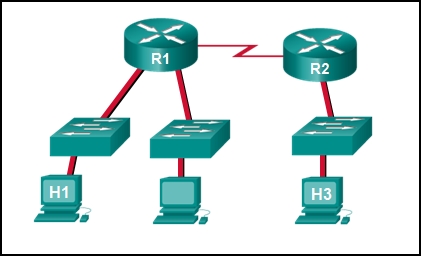
Explanation: Topic 17.4.2 – An extended ping allows an administrator to select specific ping features. For example in this situation, the network administrator could do an extended ping and specify a source address of the gigabit Ethernet port on the router. The destination address would be the IP address of host H1. If the ping succeeds connectivity exists from the Ethernet router interface on R2 to device H1.
39. Refer to the exhibit. Baseline documentation for a small company had ping round trip time statistics of 36/97/132 between hosts H1 and H3. Today the network administrator checked connectivity by pinging between hosts H1 and H3 that resulted in a round trip time of 1458/2390/6066. What does this indicate to the network administrator?
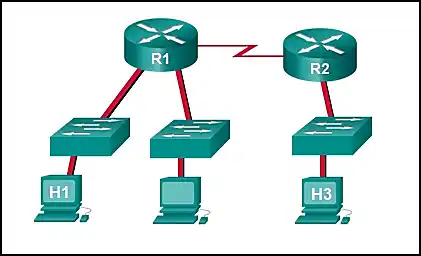
Explanation: Topic 17.4.5 – Ping round trip time statistics are shown in milliseconds. The larger the number the more delay. A baseline is critical in times of slow performance. By looking at the documentation for the performance when the network is performing fine and comparing it to information when there is a problem, a network administrator can resolve problems faster.
40. Which network service automatically assigns IP addresses to devices on the network?
Explanation: Topic 17.2.2 – Dynamic Host Configuration Protocol (DHCP) can be used to allow end devices to automatically configure IP information, such as their IP address, subnet mask, DNS server, and default gateway. The DNS service is used to provide domain name resolution, mapping hostnames to IP addresses. Telnet is a method for remotely accessing a CLI session of a switch or router. Traceroute is a command used to determine the path a packet takes as it traverses the network.
41. Which command can an administrator execute to determine what interface a router will use to reach remote networks?
Explanation: Topic 17.5.5 – The show ip route command is used to display the IP routing table of the router. The IP routing table will show a list of known local and remote networks and the interfaces that the router will use to reach those networks.
42. On which two interfaces or ports can security be improved by configuring executive timeouts? (Choose two.)
Explanation: Topic 16.4.3 – Executive timeouts allow the Cisco device to automatically disconnect users after they have been idle for the specified time. Console, vty, and aux ports can be configured with executive timeouts.
43. When configuring SSH on a router to implement secure network management, a network engineer has issued the login local and transport input ssh line vty commands. What three additional configuration actions have to be performed to complete the SSH configuration? (Choose three.)
Explanation: Topic 16.4.4 – SSH is automatically enabled after the RSA keys are generated. Setting user privilege levels and configuring role-based CLI access are good security practices but are not a requirement of implementing SSH.
44. What is considered the most effective way to mitigate a worm attack?
Explanation: Topic 16.3.3 – Because worms take advantage of vulnerabilities in the system itself, the most effective way to mitigate worm attacks is to download security updates from the operating system vendor and patch all vulnerable systems.
45. Which statement describes the ping and tracert commands?
Explanation: Topic 17.4.1 – The ping utility tests end-to-end connectivity between the two hosts. However, if the message does not reach the destination, there is no way to determine where the problem is located. On the other hand, the traceroute utility (tracert in Windows) traces the route a message takes from its source to the destination. Traceroute displays each hop along the way and the time it takes for the message to get to that network and back.
46. A technician is to document the current configurations of all network devices in a college, including those in off-site buildings. Which protocol would be best to use to securely access the network devices?
Explanation: Topic 16.4.4 – Telnet sends passwords and other information in clear text, while SSH encrypts its data. FTP and HTTP do not provide remote device access for configuration purposes.
47. Open the PT Activity. Perform the tasks in the activity instructions and then answer the question. Which command has to be configured on the router to complete the SSH configuration?
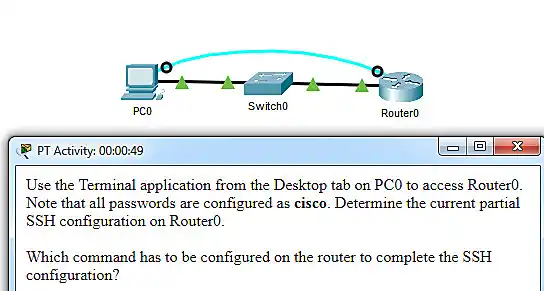

Explanation: Topic 16.4.4 – The missing command to complete the SSH configuration is transport input ssh in line vty 0 4 mode.The commands service password-encryption and enable secret class do configure secure features on the router, but are not required to configure SSH. The command ip domain-name cisco.com is not required because the command ip domain-name span.com has been used.
48. An administrator decides to use "WhatAreyouwaiting4" as the password on a newly installed router. Which statement applies to the password choice?
Explanation: Topic 16.4.2 – A passphrase is strong because it combines multiple words.
49. An administrator decides to use "pR3s!d7n&0" as the password on a newly installed router. Which statement applies to the password choice?
Explanation: Topic 16.4.2 – The password uses a mix of characters and is long.
50. An administrator decides to use "5$7*4#033!" as the password on a newly installed router. Which statement applies to the password choice?
Explanation: Topic 16.4.2 – The password uses numbers and special characters.
51. An administrator decides to use "pR3s!d7n&0" as the password on a newly installed router. Which statement applies to the password choice?
Explanation: Topic 16.4.2 – The password uses a mix of characters and is long.
52. An administrator decides to use "12345678!" as the password on a newly installed router. Which statement applies to the password choice?
Explanation: Topic 16.4.1 – Sequential numbers are weak.
53. An administrator decides to use "admin" as the password on a newly installed router. Which statement applies to the password choice?
Explanation: Topic 16.4.1 – "admin" is a common default password.
54. An administrator decides to use "Feb121978" as the password on a newly installed router. Which statement applies to the password choice?
Explanation: Topic 16.4.2 – Personal information like dates is weak.
55. An administrator decides to use "password" as the password on a newly installed router. Which statement applies to the password choice?
Explanation: Topic 16.4.1 – "password" is a commonly used weak password.
56. An administrator decides to use "RobErT" as the password on a newly installed router. Which statement applies to the password choice?
Explanation: Topic 16.4.2 – Names are easily guessed personal information.
57. An administrator decides to use "Elizabeth" as the password on a newly installed router. Which statement applies to the password choice?
Explanation: Topic 16.4.2 – Names are easily guessed personal information.
58. A network technician is troubleshooting an issue and needs to verify the IP addresses of all interfaces on a router. What is the best command to use to accomplish the task?
Explanation: Topic 17.5.7 – show ip interface brief displays IP addresses of all interfaces.
59. Students who are connected to the same switch are having slower than normal response times. The administrator suspects a duplex setting issue. What is the best command to use to accomplish the task?
Explanation: Topic 17.7.1 – show interfaces displays duplex settings.
60. A user wants to know the IP address of the PC. What is the best command to use to accomplish the task?
Explanation: Topic 17.5.1 – ipconfig displays the PC's IP address.
61. A student wants to save a router configuration to NVRAM. What is the best command to use to accomplish the task?
Explanation: Topic 17.5.1 – copy running-config startup-config saves to NVRAM.
62. A support technician needs to know the IP address of the wireless interface on a MAC. What is the best command to use to accomplish the task?
Explanation: Topic 17.5.3 – ipconfig getifaddr en0 gets the IP address of the wireless interface on macOS.
63. A network technician is troubleshooting an issue and needs to verify all of the IPv6 interface addresses on a router. What is the best command to use to accomplish the task?
Explanation: Topic 17.5.5 – show ipv6 interface displays IPv6 addresses on all interfaces.
64. A teacher is having difficulties connecting his PC to the classroom network. He needs to verify that a default gateway is configured correctly. What is the best command to use to accomplish the task?
Explanation: Topic 17.5.1 – ipconfig displays the default gateway address.
65. Only employees connected to IPv6 interfaces are having difficulty connecting to remote networks. The analyst wants to verify that IPv6 routing has been enabled. What is the best command to use to accomplish the task?
Explanation: Topic 17.7.2 – show running-config verifies IPv6 routing configuration.
66. An administrator is troubleshooting connectivity issues and needs to determine the IP address of a website. What is the best command to use to accomplish the task?
Explanation: Topic 17.7.5 – nslookup resolves domain names to IP addresses.
67. What is a characteristic of UDP?
Explanation: Topic 17.8 – UDP has no way to reorder the datagrams into their transmission order, so UDP simply reassembles the data in the order it was received and forwards it to the application.
🚀 Ace Your CCNA Exam - Complete Study Pack!
Get 500+ exam-realistic questions, Packet Tracer labs, and detailed explanations.
Building and Securing a Small Network (Modules 16-17)
Passing the CCNA 1 v7 Modules 16-17 exam requires a solid understanding of network security, device management, and troubleshooting. These modules cover network security threats, firewall filtering, SSH configuration, redundancy, troubleshooting methodology, and network documentation – essential skills for any network technician.
Why Modules 16-17 Matter for Your Networking Career
Modules 16-17 prepare you for real-world network administration. You learn how to secure network devices, implement SSH, design redundant networks, and systematically troubleshoot connectivity issues. Employers expect CCNA-certified professionals to understand AAA, security policies, firewall types, and troubleshooting tools. Mastering these topics prepares you for network security and administration roles.
Key Topics Covered in the Exam
Our verified answers address common exam questions on:
- Network Security: Authentication, authorization, accounting (AAA), firewalls, IPS, security policies.
- Threats and Attacks: Reconnaissance, DoS, man-in-the-middle, viruses, worms, Trojan horses.
- Device Hardening: SSH configuration, strong passwords, login blocking, executive timeouts.
- Troubleshooting: Ping, traceroute, extended ping, show commands, CDP, protocol analyzers.
- Network Design: Redundancy, QoS, traffic analysis, baseline documentation.
Many questions present a scenario and ask you to choose the correct command, identify a security threat, or select the right troubleshooting step. Knowing common IOS commands and security best practices is critical for success.
Common Pitfalls to Avoid
Students often confuse SSH and Telnet – SSH is encrypted and secure, while Telnet sends data in plaintext. Another common mistake is mixing up authentication, authorization, and accounting – authentication proves identity, authorization determines access, and accounting tracks actions. Also, remember the difference between viruses and worms – viruses require user interaction, while worms self-replicate.
When practicing with our answers, focus on the concept behind each correct answer. For example, instead of remembering "transport input ssh is the answer", learn why SSH requires domain name, RSA keys, and a local user database.
Study Strategies That Work
Combine our exam answers with hands-on practice. Use Packet Tracer to configure SSH on a router, implement login blocking, and test connectivity with ping and traceroute. Practice troubleshooting scenarios by intentionally misconfiguring devices and using show commands to identify issues. This practical approach cements the theory from Modules 16-17.
We also recommend creating flashcards for key terms: SSH, Telnet, AAA, IPS, firewall, redundancy, QoS, CDP, protocol analyzer, baseline. Quiz yourself daily until you can define each term without hesitation.
How to Use This Answer Page Effectively
Our goal at CoursMooc.com is to provide accurate, up-to-date answers for the latest CCNA v7 curriculum. For each question, we include an explanation—not just the correct choice. Read those explanations carefully. If you find a concept unclear, refer to the official Cisco NetAcad course materials or our additional tutorials linked below.
We regularly update this page to match any changes in the exam. If you notice discrepancies, please let us know through the comments. Your feedback helps other learners succeed.
What's Next After Modules 16-17?
Modules 16-17 conclude the CCNA 1 curriculum. After mastering these, you can take the ITNv7 Practice Final Exam and the Course Final Exam. Successfully completing all CCNA 1 v7 exams earns you the official "Introduction to Networks" badge – a stepping stone to the full CCNA certification.
Final Tips for Exam Day
Before starting the real exam:
- Get a good night's sleep – fatigue leads to misreading questions.
- Read each question twice. Some ask "Which two statements are correct?" – don't just pick one answer.
- Manage your time. You typically have 50-60 minutes for 40-50 questions. Skip difficult ones and return later.
- Look for keywords like "not", "except", or "only". One word changes the entire meaning.
- Trust your first instinct unless you find clear evidence you misread.
Remember: The CCNA v7 curriculum emphasizes practical troubleshooting. If you can explain why a command is used or why a security measure is important, you're ready. Use our answers to verify your thinking, then reinforce with simulation tools. Good luck on your exam – and on your journey to networking expertise.