CCNA 1 v7 Modules 8-10: Communicating Between Networks Exam Answers
Checkpoint Exam: Communicating Between Networks. This comprehensive study guide covers Modules 8-10 of the CCNA1 Introduction to Networks v7.0 (ITN), including network layer, IP addressing, routing, ARP, and basic router configuration.
1. Which information is used by routers to forward a data packet toward its destination?
Explanation: Topic 8.5.1 – Routers use the destination IP address to determine the next hop.
2. A computer has to send a packet to a destination host in the same LAN. How will the packet be sent?
Explanation: Topic 8.4.1 – For same LAN communication, the packet is sent directly to the destination host.
3. A router receives a packet from the Gigabit 0/0 interface and determines that the packet needs to be forwarded out the Gigabit 0/1 interface. What will the router do next?
Explanation: Topic 8.5.1 – After determining the exit interface, the router encapsulates the packet in a new Layer 2 frame.
4. Which IPv4 address can a host use to ping the loopback interface?
Explanation: Topic 8.4.1 – The loopback address is 127.0.0.1.
5. A computer can access devices on the same network but cannot access devices on other networks. What is the probable cause of this problem?
Explanation: Topic 8.4.2 – An incorrect default gateway prevents communication with remote networks.
6. Which statement describes a feature of the IP protocol?
Explanation: Topic 8.1.5 – IP protocol is a connection-less protocol, considered unreliable in terms of end-to-end delivery. It does not provide error control in the cases where receiving packets are out-of-order or in cases of missing packets. It relies on upper layer services, such as TCP, to resolve these issues.
7. Why is NAT not needed in IPv6?
Explanation: Topic 8.3.2 – The large number of public IPv6 addresses eliminates the need for NAT. Sites from the largest enterprises to single households can get public IPv6 network addresses. This avoids some of the NAT-induced application problems that are experienced by applications that require end-to-end connectivity.
8. Which parameter does the router use to choose the path to the destination when there are multiple routes available?
Explanation: Topic 8.5.1 – Routers select the path with the lowest metric.
9. What are two services provided by the OSI network layer? (Choose two.)
Explanation: Topic 8.1.1 – The network layer provides routing and encapsulation of transport layer PDUs.
10. Within a production network, what is the purpose of configuring a switch with a default gateway address?
Explanation: Topic 8.4.2 – A default gateway address allows a switch to forward packets that originate on the switch to remote networks. A default gateway address on a switch does not provide Layer 3 routing for PCs that are connected on that switch. A switch can still be accessible from Telnet as long as the source of the Telnet connection is on the local network.
11. What is a basic characteristic of the IP protocol?
Explanation: Topic 8.1.3 – Internet Protocol (IP) is a network layer protocol that does not require initial exchange of control information to establish an end-to-end connection before packets are forwarded. Thus, IP is connectionless and does not provide reliable end-to-end delivery by itself. IP is media independent. User data segmentation is a service provided at the transport layer.
12. Which field in the IPv4 header is used to prevent a packet from traversing a network endlessly?
Explanation: Topic 8.2.2 – The value of the Time-to-Live (TTL) field in the IPv4 header is used to limit the lifetime of a packet. The sending host sets the initial TTL value; which is decreased by one each time the packet is processed by a router. If the TTL field decrements to zero, the router discards the packet and sends an Internet Control Message Protocol (ICMP) Time Exceeded message to the source IP address. The Differentiated Services (DS) field is used to determine the priority of each packet. Sequence Number and Acknowledgment Number are two fields in the TCP header.
13. What is one advantage that the IPv6 simplified header offers over IPv4?
Explanation: Topic 8.3.3 – The simplified header improves packet handling efficiency.
14. What IPv4 header field identifies the upper layer protocol carried in the packet?
Explanation: Topic 8.2.2 – It is the Protocol field in the IP header that identifies the upper-layer protocol the packet is carrying. The Version field identifies the IP version. The Differential Services field is used for setting packet priority. The Identification field is used to reorder fragmented packets.
15. Refer to the exhibit. Match the packets with their destination IP address to the exiting interfaces on the router. (Not all targets are used.)
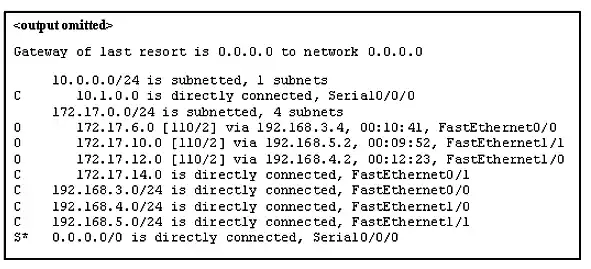
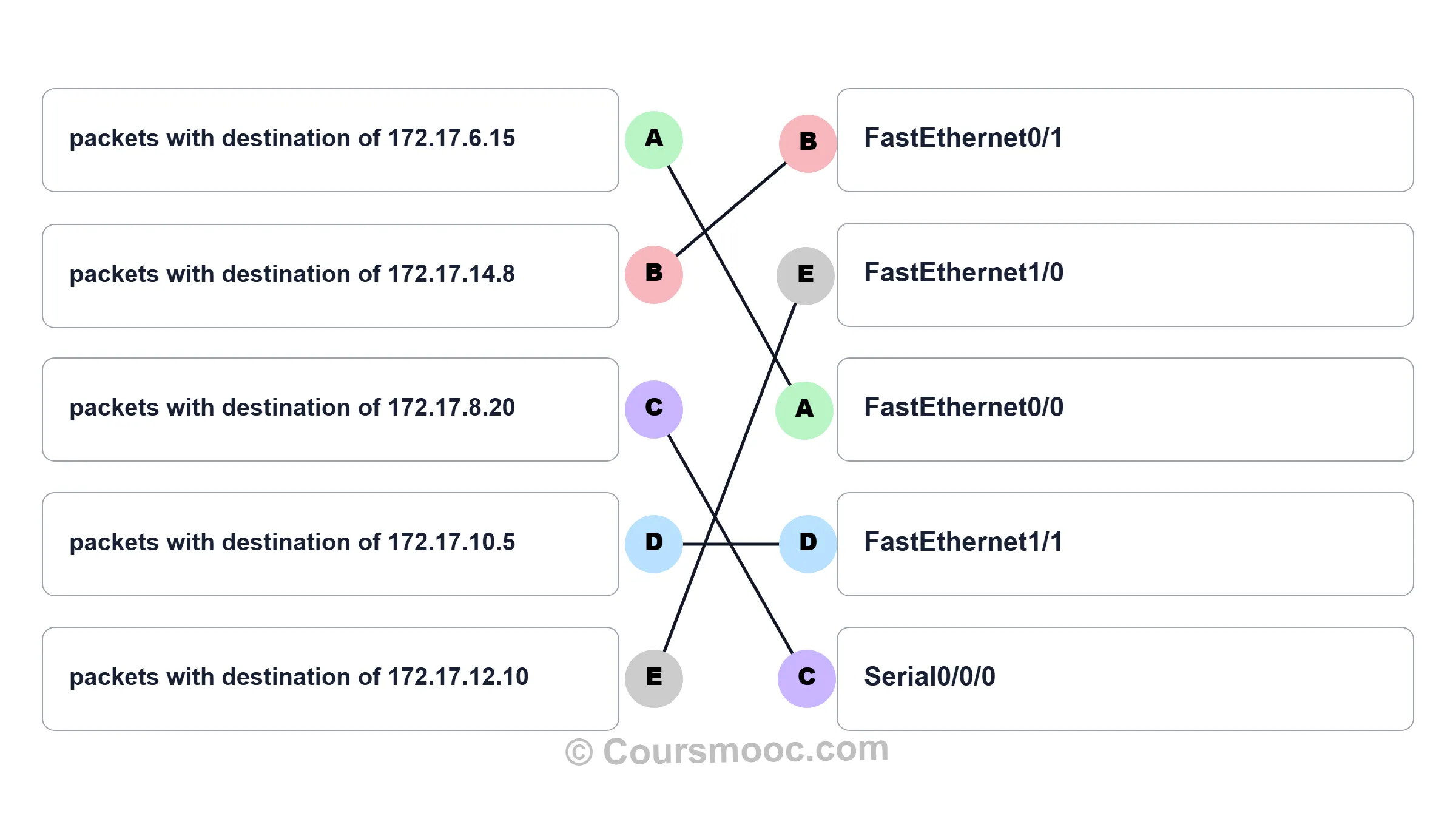
Explanation: Topic 8.5.1 - Packets with a destination of 172.17.6.15 are forwarded through Fa0/0. Packets with a destination of 172.17.10.5 are forwarded through Fa1/1. Packets with a destination of 172.17.12.10 are forwarded through Fa1/0. Packets with a destination of 172.17.14.8 are forwarded through Fa0/1. Because network 172.17.8.0 has no entry in the routing table, it will take the gateway of last resort, which means that packets with a destination of 172.17.8.20 are forwarded through Serial0/0/0. Because a gateway of last resort exists, no packets will be dropped.
16. What information does the loopback test provide?
Explanation: Topic 8.4.1 – Because the loopback test sends packets back to the host device, it does not provide information about network connectivity to other hosts. The loopback test verifies that the host NIC, drivers, and TCP/IP stack are functioning.
17. What routing table entry has a next hop address associated with a destination network?
Explanation: Topic 8.5.4 – Routing table entries for remote routes will have a next hop IP address. The next hop IP address is the address of the router interface of the next device to be used to reach the destination network. Directly-connected and local routes have no next hop, because they do not require going through another router to be reached.
18. How do hosts ensure that their packets are directed to the correct network destination?
Explanation: Topic 8.4.4 – Hosts must maintain their own local routing table to ensure that network layer packets are directed to the correct destination network. This local table typically contains a route to the loopback interface, a route to the network that the host is connected to, and a local default route, which represents the route that packets must take to reach all remote network addresses.
19. When transporting data from real-time applications, such as streaming audio and video, which field in the IPv6 header can be used to inform the routers and switches to maintain the same path for the packets in the same conversation?
Explanation: Topic 8.3.4 – The Flow Label in IPv6 header is a 20-bit field that provides a special service for real-time applications. This field can be used to inform routers and switches to maintain the same path for the packet flow so that packets will not be reordered.
20. What statement describes the function of the Address Resolution Protocol?
Explanation: Topic 9.2.1 – When a PC wants to send data on the network, it always knows the IP address of the destination. However, it also needs to discover the MAC address of the destination. ARP is the protocol that is used to discover the MAC address of a host that belongs to the same network.
21. Under which two circumstances will a switch flood a frame out of every port except the port that the frame was received on? (Choose two.)
Explanation: Topic 9.2.3 – A switch will flood a frame out of every port, except the one that the frame was received from, under two circumstances. Either the frame has the broadcast address as the destination address, or the destination address is unknown to the switch.
22. Which statement describes the treatment of ARP requests on the local link?
Explanation: Topic 9.2.8 – ARP requests are broadcasts; all devices on the local link process them.
23. Which destination address is used in an ARP request frame?
Explanation: Topic 9.2.3 – Explanation: Topic 9.2.3 The purpose of an ARP request is to find the MAC address of the destination host on an Ethernet LAN. The ARP process sends a Layer 2 broadcast to all devices on the Ethernet LAN. The frame contains the IP address of the destination and the broadcast MAC address, FFFF.FFFF.FFFF. The host with the IP address that matches the IP address in the ARP request will reply with a unicast frame that includes the MAC address of the host. Thus the original sending host will obtain the destination IP and MAC address pair to continue the encapsulation process for data transmission.
24. A network technician issues the arp -d * command on a PC after the router that is connected to the LAN is reconfigured. What is the result after this command is issued?
Explanation: Topic 9.2.6 – Issuing the arp –d * command on a PC will clear the ARP cache content. This is helpful when a network technician wants to ensure the cache is populated with updated information.
25. Refer to the exhibit. The exhibit shows a small switched network and the contents of the MAC address table of the switch. PC1 has sent a frame addressed to PC3. What will the switch do with the frame?
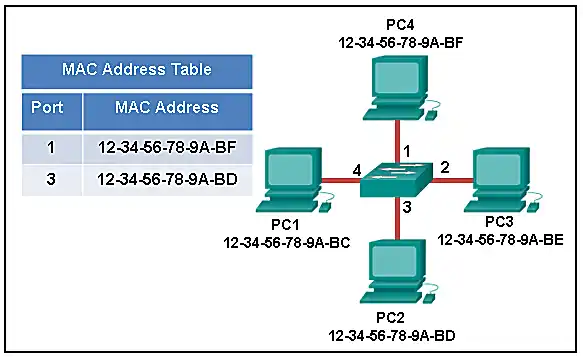
Explanation: Topic 9.2.8 – The MAC address of PC3 is not present in the MAC table of the switch. Because the switch does not know where to send the frame that is addressed to PC3, it will forward the frame to all the switch ports, except for port 4, which is the incoming port.
26. Which two types of IPv6 messages are used in place of ARP for address resolution?
Explanation: Topic 9.3.2 – IPv6 does not use ARP. Instead, ICMPv6 neighbor discovery is used by sending neighbor solicitation and neighbor advertisement messages.
27. What is the aim of an ARP spoofing attack?
Explanation: Topic 9.2.8 – In an ARP spoofing attack, a malicious host intercepts ARP requests and replies to them so that network hosts will map an IP address to the MAC address of the malicious host.
28. Refer to the exhibit. PC1 attempts to connect to File_server1 and sends an ARP request to obtain a destination MAC address. Which MAC address will PC1 receive in the ARP reply?
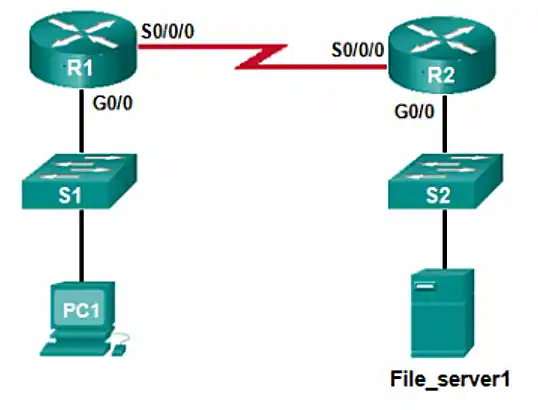
Explanation: Topic 9.2.5 – PC1 must have a MAC address to use as a destination Layer 2 address. PC1 will send an ARP request as a broadcast and R1 will send back an ARP reply with its G0/0 interface MAC address. PC1 can then forward the packet to the MAC address of the default gateway, R1.
29. Where are IPv4 address to Layer 2 Ethernet address mappings maintained on a host computer?
Explanation: Topic 9.2.2 – The ARP cache is used to store IPv4 addresses and the Ethernet physical addresses or MAC addresses to which the IPv4 addresses are mapped. Incorrect mappings of IP addresses to MAC addresses can result in loss of end-to-end connectivity.
30. What important information is examined in the Ethernet frame header by a Layer 2 device in order to forward the data onward?
Explanation: Topic 9.1.1 – The Layer 2 device, such as a switch, uses the destination MAC address to determine which path (interface or port) should be used to send the data onward to the destination device.
31. Match the commands to the correct actions. (Not all options are used.)
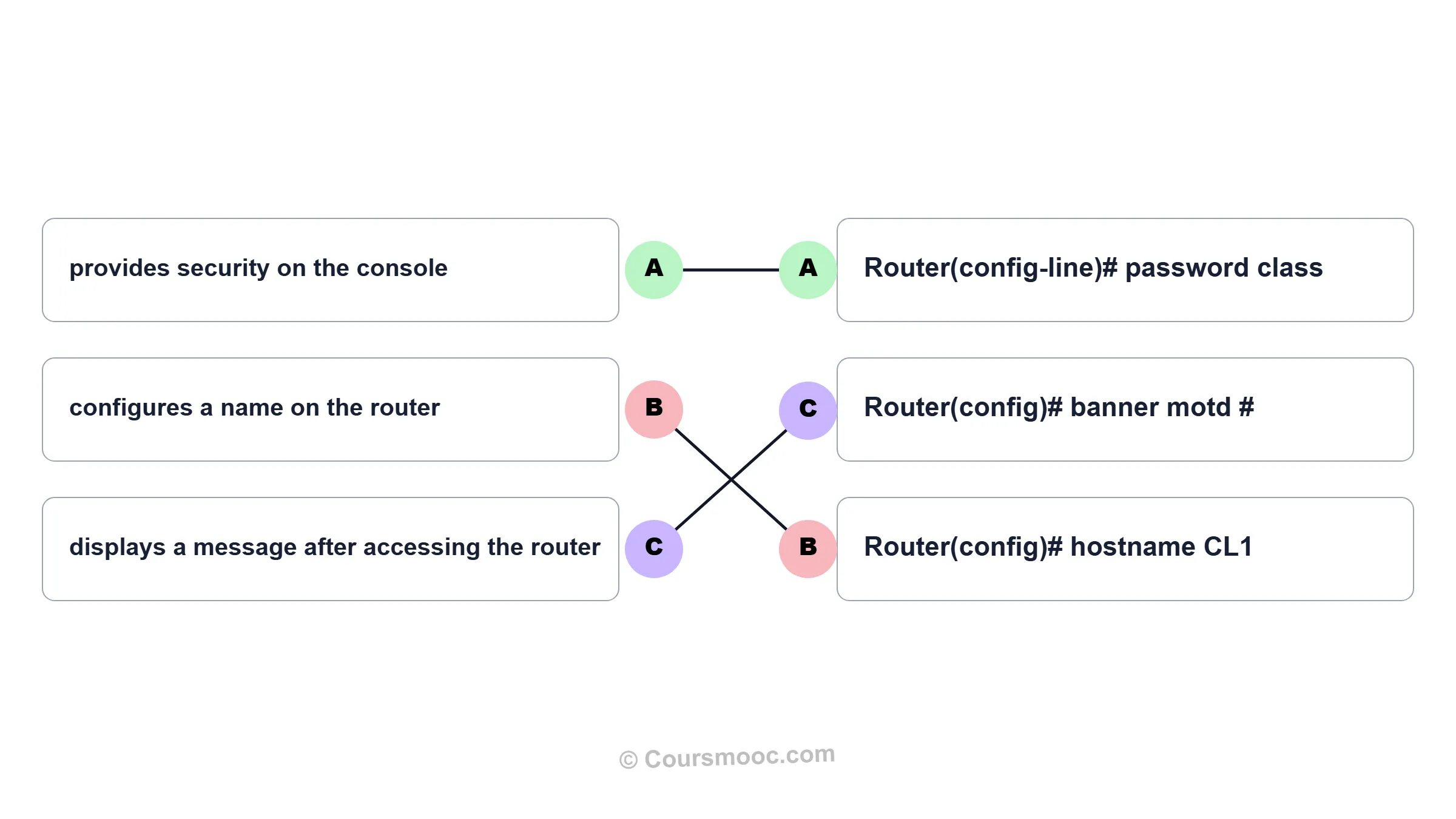
Explanation: Topic 10.1.1
| Action | Command |
|---|---|
| displays a message after accessing the router | Router(config)# banner motd # |
| provides security on the console | Router(config-line)# password class |
| configures a name on the router | Router(config)# hostname CL1 |
32. A new network administrator has been asked to enter a banner message on a Cisco device. What is the fastest way a network administrator could test whether the banner is properly configured?
Explanation: Topic 10.1.1 – While at the privileged mode prompt such as Router#, type exit,press Enter, and the banner message appears. Power cycling a network device that has had the banner motd command issued will also display the banner message, but this is not a quick way to test the configuration.
33. A network administrator requires access to manage routers and switches locally and remotely. Match the description to the access method. (Not all options are used.)
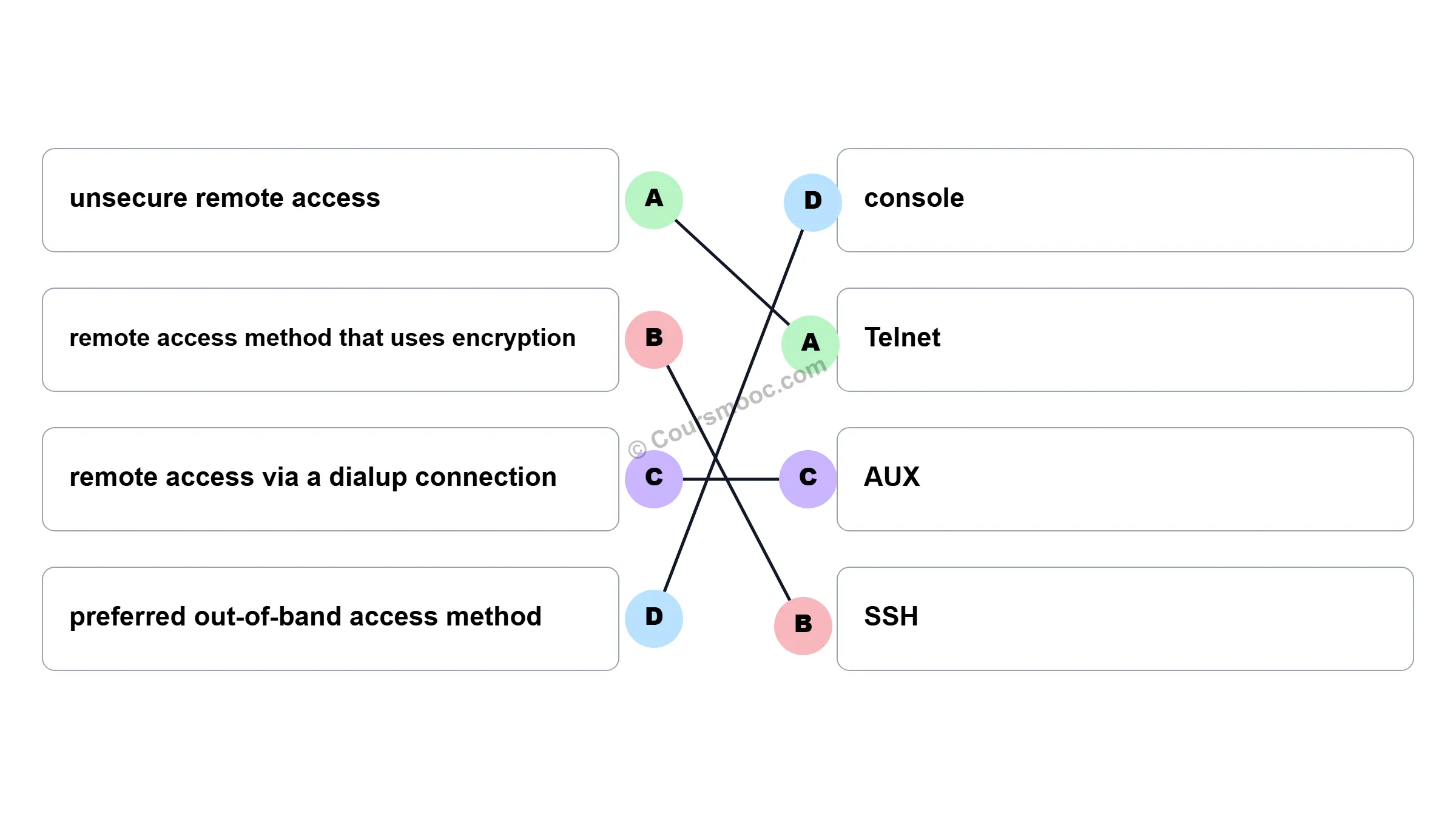
Explanation: Topic 10.1.1 - Both the console and AUX ports can be used to directly connect to a Cisco network device for management purposes. However, it is more common to use the console port. The AUX port is more often used for remote access via a dial up connection. SSH and Telnet are both remote access methods that depend on an active network connection. SSH uses a stronger password authentication than Telnet uses and also uses encryption on transmitted data.
| Description | Method |
|---|---|
| remote access method that uses encryption | SSH |
| preferred out-of-band access method | console |
| remote access via a dialup connection | AUX |
| unsecure remote access | Telnet |
34. Match the phases to the functions during the boot up process of a Cisco router. (Not all options are used.)
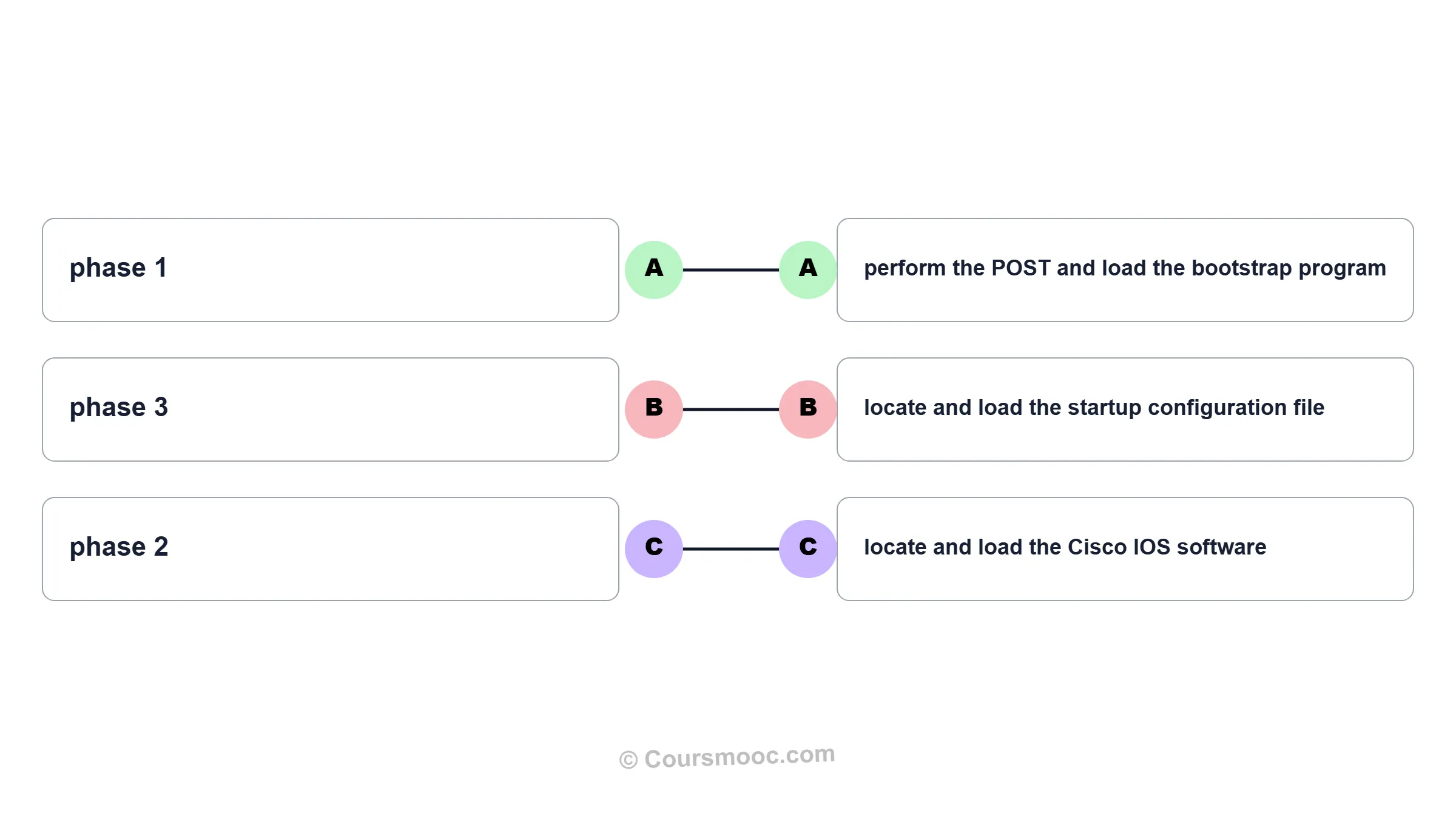
Explanation: Topic 10.1.1 – Boot phases: POST/load bootstrap, locate/load IOS, locate/load startup config.
35. Match the command with the device mode at which the command is entered. (Not all options are used.)
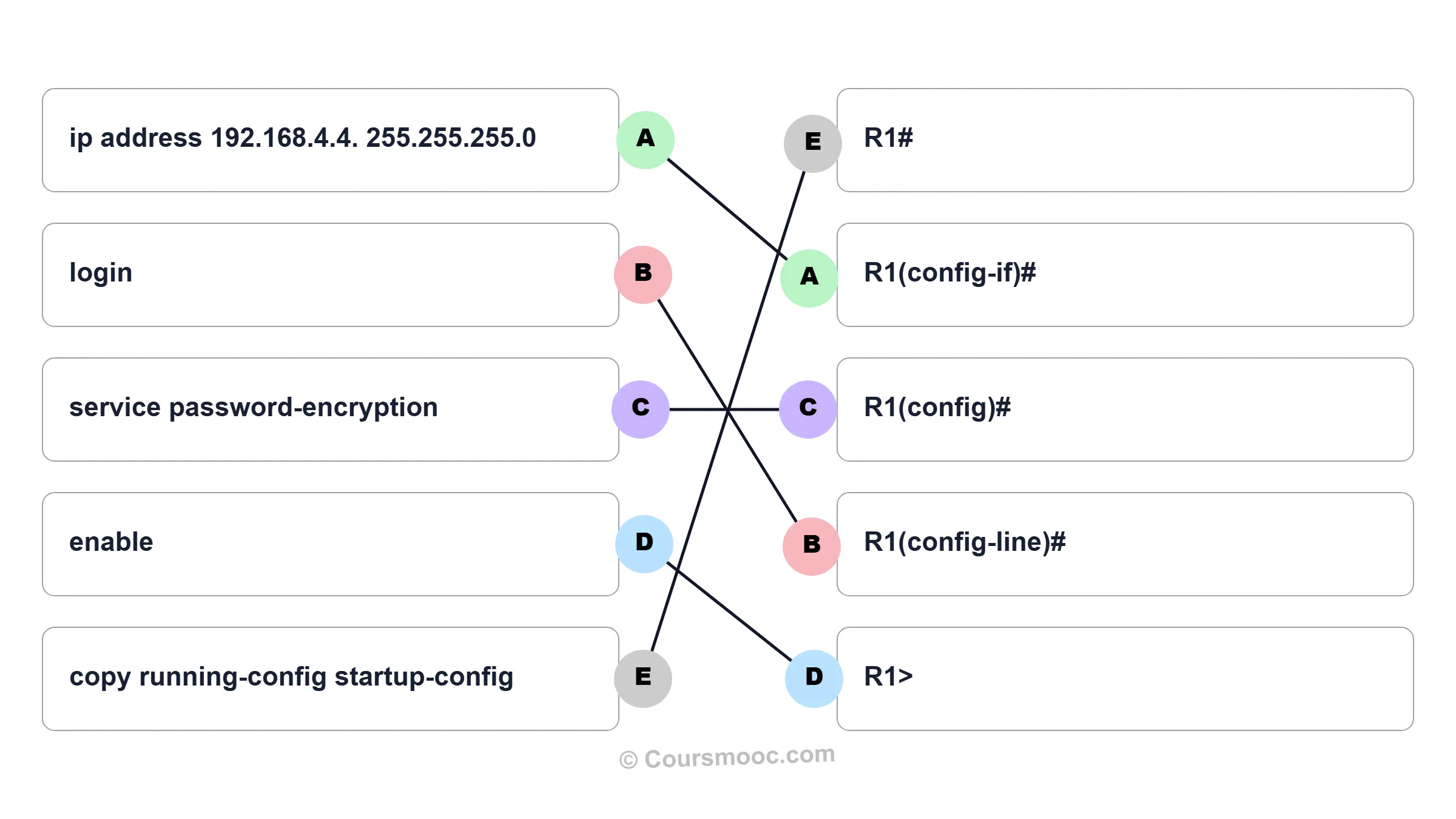
Explanation: Topic 10.1.1 - The enable command is entered in R1> mode. The login command is entered in R1(config-line)# mode. The copy running-config startup-config command is entered in R1# mode. The ip address 192.168.4.4 255.255.255.0 command is entered in R1(config-if)# mode. The service password-encryption command is entered in global configuration mode.
| Command | Mode |
|---|---|
| service password-encryption | R1(config)# |
| enable | R1> |
| copy running-config startup-config | R1# |
| login | R1(config-line)# |
| ip address 192.168.4.4 255.255.255.0 | R1(config-if)# |
36. What are two functions of NVRAM? (Choose two.)
Explanation: Topic 10.1.1 – NVRAM is non-volatile and stores the startup configuration.
37. A router boots and enters setup mode. What is the reason for this?
Explanation: Topic 10.1.1 – If a router cannot locate the startup-config file in NVRAM, it will enter setup mode to allow the configuration to be entered from the console device.
38. The global configuration command ip default-gateway 172.16.100.1 is applied to a switch. What is the effect of this command?
Explanation: Topic 10.3.2 – The default gateway allows the switch to be managed from a different network.
39. What happens when the transport input ssh command is entered on the switch vty lines?
Explanation: Topic 10.1.1 – The transport input ssh command when entered on the switch vty (virtual terminal lines) will encrypt all inbound controlled telnet connections.
40. Refer to the exhibit. A user PC has successfully transmitted packets to www.cisco.com. Which IP address does the user PC target in order to forward its data off the local network?
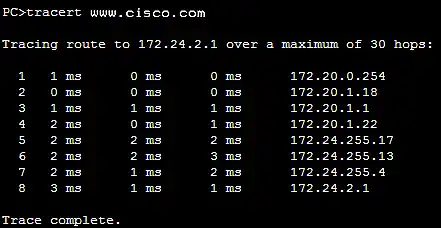
Explanation: Topic 10.3.1 – The default gateway (172.20.0.254) is used to forward traffic off the local network.
41. Match the configuration mode with the command that is available in that mode. (Not all options are used.)
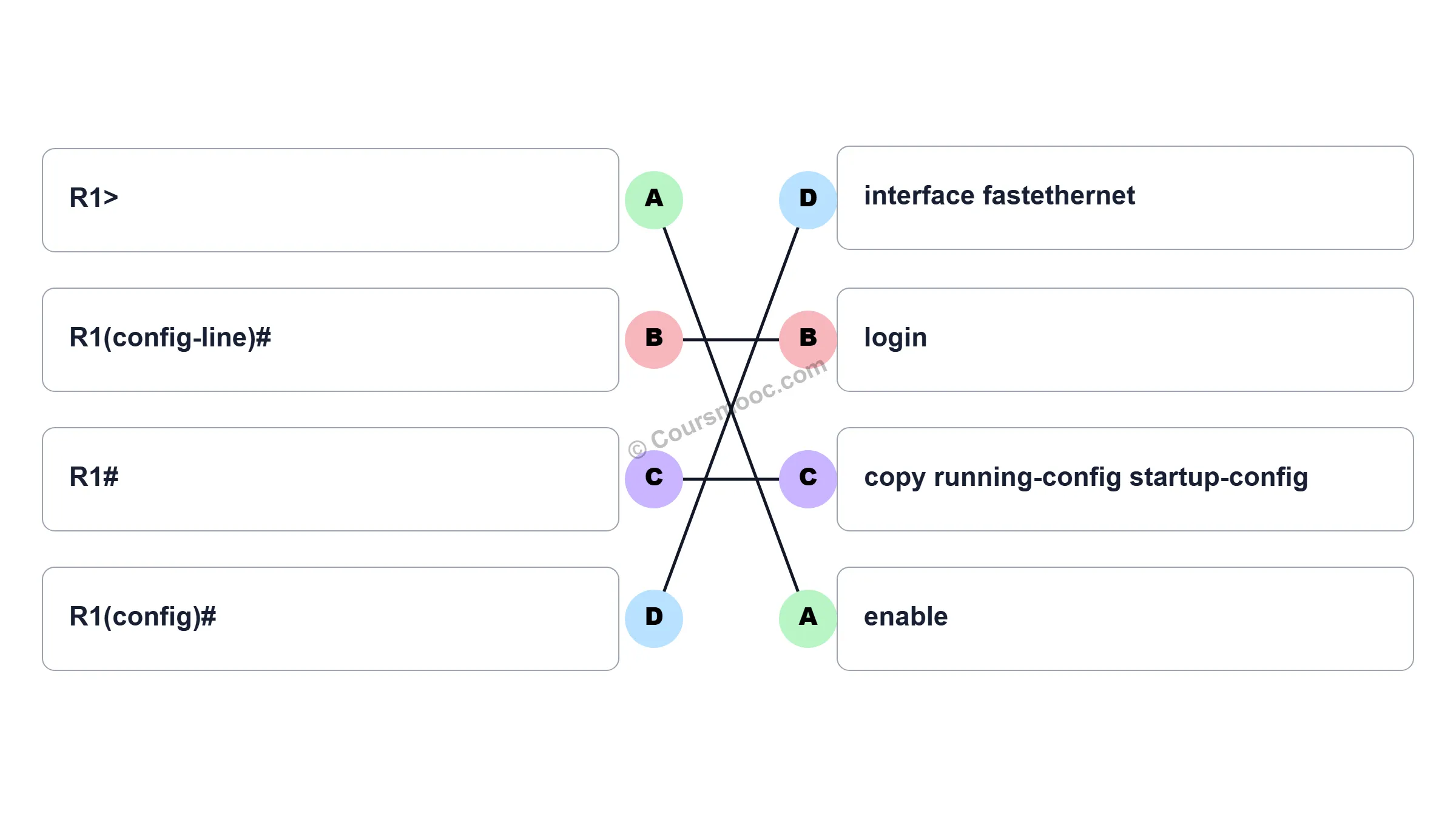
Explanation: Topic 10.2.1 - The enable command is entered at the R1> prompt. The login command is entered at the R1(config-line)# prompt. The copy running-config startup-config command is entered at the R1# prompt. The interface fastethernet 0/0 command is entered at the R1(config)# prompt.
| Mode | Command |
|---|---|
| R1> | enable |
| R1# | copy running-config startup-config |
| R1(config-line)# | login |
| R1(config)# | interface fastethernet 0/0 |
42. Which three commands are used to set up secure access to a router through a connection to the console interface? (Choose three.)
Explanation: Topic 10.1.1 – Console port security requires line console 0, password, and login.
43. Refer to the exhibit. Consider the IP address configuration shown from PC1. What is a description of the default gateway address?
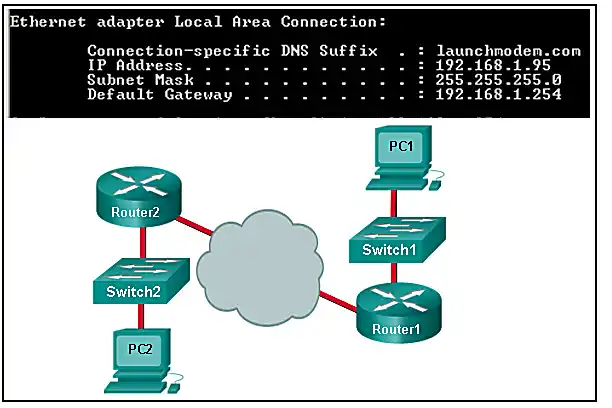
Explanation: Topic 10.3.1 – The default gateway is used to route packets destined for remote networks. The default gateway IP address is the address of the first Layer 3 device (the router interface) that connects to the same network.
44. Which two functions are primary functions of a router? (Choose two.)
Explanation: Topic 8.1.1 – A router accepts a packet and accesses its routing table to determine the appropriate exit interface based on the destination address. The router then forwards the packet out of that interface.
45. What is the effect of using the Router# copy running-config startup-config command on a router?
Explanation: Topic 10.1.1 – The command copy running-config startup-config copies the running-configuration file from RAM into NVRAM and saves it as the startup-configuration file. Since NVRAM is none-volatile memory it will be able to retain the configuration details when the router is powered off.
46. What will happen if the default gateway address is incorrectly configured on a host?
Explanation: Topic 10.3.1 – When a host needs to send a message to another host located on the same network, it can forward the message directly. However, when a host needs to send a message to a remote network, it must use the router, also known as the default gateway. This is because the data link frame address of the remote destination host cannot be used directly. Instead, the IP packet has to be sent to the router (default gateway) and the router will forward the packet toward its destination. Therefore, if the default gateway is incorrectly configured, the host can communicate with other hosts on the same network, but not with hosts on remote networks.
47. What are two potential network problems that can result from ARP operation? (Choose two.)
Explanation: Topic 9.2.8 – Large numbers of ARP broadcast messages could cause momentary data communications delays. Network attackers could manipulate MAC address and IP address mappings in ARP messages with the intent to intercept network traffic. ARP requests and replies cause entries to be made into the ARP table, not the MAC address table. ARP table overflows are very unlikely. Manually configuring static ARP associations is a way to prevent, not facilitate, ARP poisoning and MAC address spoofing. Multiple ARP replies resulting in the switch MAC address table containing entries that match the MAC addresses of connected nodes and are associated with the relevant switch port are required for normal switch frame forwarding operations. It is not an ARP caused network problem.
48. Open the PT activity. Perform the tasks in the activity instructions and then answer the question. Which interfaces in each router are active and operational?
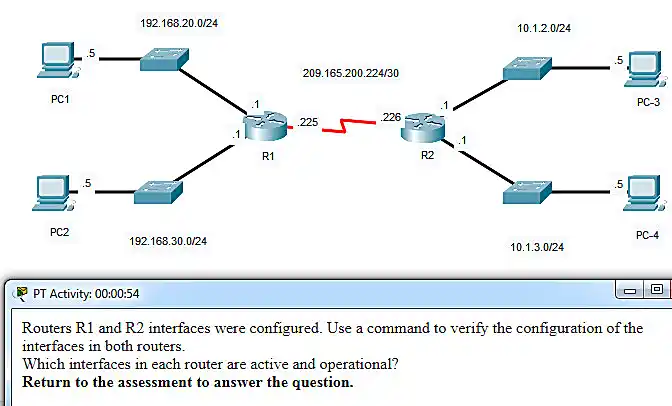

Explanation: Topic 10.2.4 – The command to use for this activity is show ip interface brief in each router. The active and operational interfaces are represented by the value “up” in the “Status” and “Protocol” columns. The interfaces in R1 with these characteristics are G0/0 and S0/0/0. In R2 they are G0/1 and S0/0/0.
49. Which term describes a field in the IPv4 packet header used to identify the next level protocol?
Explanation: Topic 8.2.2 – The Protocol field identifies the next-level protocol.
50. Which term describes a field in the IPv4 packet header that contains an 8-bit binary value used to determine the priority of each packet?
Explanation: Topic 8.2.2 – The Differentiated Services (DS) field is used for QoS.
51. Which term describes a field in the IPv4 packet header that contains a 32-bit binary value associated with an interface on the sending device?
Explanation: Topic 8.2.2 – The source IPv4 address is the 32-bit address of the sending host.
52. Which term describes a field in the IPv4 packet header used to detect corruption in the IPv4 header?
Explanation: Topic 8.2.2 – The header checksum detects errors in the IPv4 header.
53. Refer to the exhibit. A network administrator is connecting a new host to the Payroll LAN. The host needs to communicate with remote networks. What IP address would be configured as the default gateway on the new host?
RTR1(config)# interface gi0/1
RTR1(config-if)# description Connects to the Marketing LAN
RTR1(config-if)# ip address 10.27.15.17 255.255.255.0
RTR1(config-if)# no shutdown
RTR1(config-if)# interface gi0/0
RTR1(config-if)# description Connects to the Payroll LAN
RTR1(config-if)# ip address 10.27.14.148 255.255.255.0
RTR1(config-if)# no shutdown
RTR1(config-if)# interface s0/0/0
RTR1(config-if)# description Connects to the ISP
RTR1(config-if)# ip address 10.14.15.254 255.255.255.0
RTR1(config-if)# no shutdown
RTR1(config-if)# interface s0/0/1
RTR1(config-if)# description Connects to the Head Office WAN
RTR1(config-if)# ip address 203.0.113.39 255.255.255.0
RTR1(config-if)# no shutdown
RTR1(config-if)# end
Explanation: Topic 10.3.1 – The default gateway for the Payroll LAN is the interface IP on that network (10.27.14.148).
54. Which term describes a field in the IPv4 packet header that contains a unicast, multicast, or broadcast address?
Explanation: Topic 8.2.2 – The destination IPv4 address can be unicast, multicast, or broadcast.
55. Which term describes a field in the IPv4 packet header used to limit the lifetime of a packet?
Explanation: Topic 8.2.2 – TTL limits packet lifetime.
56. Which term describes a field in the IPv4 packet header that contains a 4-bit binary value set to 0100?
Explanation: Topic 8.2.2 – The Version field is 0100 for IPv4.
57. Which term describes a field in the IPv4 packet header used to identify the next level protocol?
Explanation: Topic 8.2.2 – The Protocol field identifies the next level protocol.
58. Which term describes a field in the IPv4 packet header that contains a 4-bit binary value set to 0100?
Explanation: Topic 8.2.2 – The Version field is 0100 for IPv4.
59. What property of ARP causes cached IP-to-MAC mappings to remain in memory longer?
Explanation: Topic 9.2.4 – ARP entries are timed out after a period.
60. What property of ARP allows MAC addresses of frequently used servers to be fixed in the ARP table?
Explanation: Topic 9.2.4 – Static ARP entries are permanent.
61. What property of ARP allows MAC addresses of frequently used servers to be fixed in the ARP table?
Explanation: Topic 9.2.4 – Static ARP entries are permanent.
62. What property of ARP allows hosts on a LAN to send traffic to remote networks?
Explanation: Topic 9.2.4 – ARP resolves the default gateway's MAC, enabling remote communication.
63. Refer to the exhibit. A network administrator is connecting a new host to the Registrar LAN. The host needs to communicate with remote networks. What IP address would be configured as the default gateway on the new host?
Floor(config)# interface gi0/1
Floor(config-if)# description Connects to the Registrar LAN
Floor(config-if)# ip address 192.168.235.234 255.255.255.0
Floor(config-if)# no shutdown
Floor(config-if)# interface gi0/0
Floor(config-if)# description Connects to the Manager LAN
Floor(config-if)# ip address 192.168.234.114 255.255.255.0
Floor(config-if)# no shutdown
Floor(config-if)# interface s0/0/0
Floor(config-if)# description Connects to the ISP
Floor(config-if)# ip address 10.234.235.254 255.255.255.0
Floor(config-if)# no shutdown
Floor(config-if)# interface s0/0/1
Floor(config-if)# description Connects to the Head Office WAN
Floor(config-if)# ip address 203.0.113.3 255.255.255.0
Floor(config-if)# no shutdown
Floor(config-if)# end
Explanation: Topic 10.3.1 – The default gateway is the interface IP on the Registrar LAN (192.168.235.234).
64. What property of ARP forces all Ethernet NICs to process an ARP request?
Explanation: Topic 9.2.3 – ARP requests use a broadcast MAC, so all NICs process them.
65. What property of ARP causes a reply only to the source sending an ARP request?
Explanation: Topic 9.2.3 – The ARP reply is sent as unicast to the source MAC address.
66. What property of ARP causes the request to be flooded out all ports of a switch except for the port receiving the ARP request?
Explanation: Topic 9.2.3 – Since the ARP request is a broadcast, the switch floods it.
67. What property of ARP causes the NICs receiving an ARP request to pass the data portion of the Ethernet frame to the ARP process?
Explanation: Topic 9.2.3 – The Ethernet type 0x806 indicates ARP.
68. What property of ARP causes the NICs receiving an ARP request to pass the data portion of the Ethernet frame to the ARP process?
Explanation: Topic 9.2.3 – The Ethernet type 0x806 indicates ARP.
69. Refer to the exhibit. A network administrator is connecting a new host to the Service LAN. The host needs to communicate with remote networks. What IP address would be configured as the default gateway on the new host?
Main(config)# interface gi0/1
Main(config-if)# description Connects to the Service LAN
Main(config-if)# ip address 172.29.157.156 255.255.255.0
Main(config-if)# no shutdown
Main(config-if)# interface gi0/0
Main(config-if)# description Connects to the Engineering LAN
Main(config-if)# ip address 172.29.156.36 255.255.255.0
Main(config-if)# no shutdown
Main(config-if)# interface s0/0/0
Main(config-if)# description Connects to the ISP
Main(config-if)# ip address 10.156.157.254 255.255.255.0
Main(config-if)# no shutdown
Main(config-if)# interface s0/0/1
Main(config-if)# description Connects to the Head Office WAN
Main(config-if)# ip address 198.51.100.177 255.255.255.0
Main(config-if)# no shutdown
Main(config-if)# end
Explanation: Topic 10.3.1 – The default gateway is the interface IP on the Service LAN (172.29.157.156).
70. Refer to the exhibit. A network administrator is connecting a new host to the Medical LAN. The host needs to communicate with remote networks. What IP address would be configured as the default gateway on the new host?
BldgA(config)# interface gi0/1
BldgA(config-if)# description Connects to the Medical LAN
BldgA(config-if)# ip address 192.168.191.189 255.255.255.0
BldgA(config-if)# no shutdown
BldgA(config-if)# interface gi0/0
BldgA(config-if)# description Connects to the Client LAN
BldgA(config-if)# ip address 192.168.190.70 255.255.255.0
BldgA(config-if)# no shutdown
BldgA(config-if)# interface s0/0/0
BldgA(config-if)# description Connects to the ISP
BldgA(config-if)# ip address 10.190.191.254 255.255.255.0
BldgA(config-if)# no shutdown
BldgA(config-if)# interface s0/0/1
BldgA(config-if)# description Connects to the Head Office WAN
BldgA(config-if)# ip address 198.51.100.213 255.255.255.0
BldgA(config-if)# no shutdown
BldgA(config-if)# end
Explanation: Topic 10.3.1 – The default gateway is the interface IP on the Medical LAN (192.168.191.189).
71. Refer to the exhibit. A network administrator is connecting a new host to the Registrar LAN. The host needs to communicate with remote networks. What IP address would be configured as the default gateway on the new host?
Floor(config)# interface gi0/1
Floor(config-if)# description Connects to the Registrar LAN
Floor(config-if)# ip address 192.168.225.223 255.255.255.0
Floor(config-if)# no shutdown
Floor(config-if)# interface gi0/0
Floor(config-if)# description Connects to the Manager LAN
Floor(config-if)# ip address 192.168.224.103 255.255.255.0
Floor(config-if)# no shutdown
Floor(config-if)# interface s0/0/0
Floor(config-if)# description Connects to the ISP
Floor(config-if)# ip address 10.224.225.254 255.255.255.0
Floor(config-if)# no shutdown
Floor(config-if)# interface s0/0/1
Floor(config-if)# description Connects to the Head Office WAN
Floor(config-if)# ip address 203.0.113.246 255.255.255.0
Floor(config-if)# no shutdown
Floor(config-if)# end
Explanation: Topic 10.3.1 – The default gateway is the interface IP on the Registrar LAN (192.168.225.223).
72. Refer to the exhibit. A network administrator is connecting a new host to the Manager LAN. The host needs to communicate with remote networks. What IP address would be configured as the default gateway on the new host?
Floor(config)# interface gi0/1
Floor(config-if)# description Connects to the Registrar LAN
Floor(config-if)# ip address 10.118.63.65 255.255.255.0
Floor(config-if)# no shutdown
Floor(config-if)# interface gi0/0
Floor(config-if)# description Connects to the Manager LAN
Floor(config-if)# ip address 10.118.62.196 255.255.255.0
Floor(config-if)# no shutdown
Floor(config-if)# interface s0/0/0
Floor(config-if)# description Connects to the ISP
Floor(config-if)# ip address 10.62.63.254 255.255.255.0
Floor(config-if)# no shutdown
Floor(config-if)# interface s0/0/1
Floor(config-if)# description Connects to the Head Office WAN
Floor(config-if)# ip address 209.165.200.87 255.255.255.0
Floor(config-if)# no shutdown
Floor(config-if)# end
Explanation: Topic 10.3.1 – The default gateway is the interface IP on the Manager LAN (10.118.62.196).
73. Refer to the exhibit. A network administrator is connecting a new host to the Store LAN. The host needs to communicate with remote networks. What IP address would be configured as the default gateway on the new host?
HQ(config)# interface gi0/1
HQ(config-if)# description Connects to the Branch LAN
HQ(config-if)# ip address 172.19.99.99 255.255.255.0
HQ(config-if)# no shutdown
HQ(config-if)# interface gi0/0
HQ(config-if)# description Connects to the Store LAN
HQ(config-if)# ip address 172.19.98.230 255.255.255.0
HQ(config-if)# no shutdown
HQ(config-if)# interface s0/0/0
HQ(config-if)# description Connects to the ISP
HQ(config-if)# ip address 10.98.99.254 255.255.255.0
HQ(config-if)# no shutdown
HQ(config-if)# interface s0/0/1
HQ(config-if)# description Connects to the Head Office WAN
HQ(config-if)# ip address 209.165.200.120 255.255.255.0
HQ(config-if)# no shutdown
HQ(config-if)# end
Explanation: Topic 10.3.1 – The default gateway is the interface IP on the Store LAN (172.19.98.230).
74. Refer to the exhibit. A network administrator is connecting a new host to the Store LAN. The host needs to communicate with remote networks. What IP address would be configured as the default gateway on the new host?
HQ(config)# interface gi0/1
HQ(config-if)# description Connects to the Branch LAN
HQ(config-if)# ip address 172.20.133.132 255.255.255.0
HQ(config-if)# no shutdown
HQ(config-if)# interface gi0/0
HQ(config-if)# description Connects to the Store LAN
HQ(config-if)# ip address 172.20.132.13 255.255.255.0
HQ(config-if)# no shutdown
HQ(config-if)# interface s0/0/0
HQ(config-if)# description Connects to the ISP
HQ(config-if)# ip address 10.132.133.254 255.255.255.0
HQ(config-if)# no shutdown
HQ(config-if)# interface s0/0/1
HQ(config-if)# description Connects to the Head Office WAN
HQ(config-if)# ip address 198.51.100.156 255.255.255.0
HQ(config-if)# no shutdown
HQ(config-if)# end
Explanation: Topic 10.3.1 – The default gateway is the interface IP on the Store LAN (172.20.132.13).
75. Refer to the exhibit. A network administrator is connecting a new host to the Service LAN. The host needs to communicate with remote networks. What IP address would be configured as the default gateway on the new host?
Main(config)# interface gi0/1
Main(config-if)# description Connects to the Service LAN
Main(config-if)# ip address 192.168.167.166 255.255.255.0
Main(config-if)# no shutdown
Main(config-if)# interface gi0/0
Main(config-if)# description Connects to the Engineering LAN
Main(config-if)# ip address 192.168.166.46 255.255.255.0
Main(config-if)# no shutdown
Main(config-if)# interface s0/0/0
Main(config-if)# description Connects to the ISP
Main(config-if)# ip address 10.166.167.254 255.255.255.0
Main(config-if)# no shutdown
Main(config-if)# interface s0/0/1
Main(config-if)# description Connects to the Head Office WAN
Main(config-if)# ip address 198.51.100.189 255.255.255.0
Main(config-if)# no shutdown
Main(config-if)# end
Explanation: Topic 10.3.1 – The default gateway is the interface IP on the Service LAN (192.168.167.166).
76. Refer to the exhibit. A network administrator is connecting a new host to the Medical LAN. The host needs to communicate with remote networks. What IP address would be configured as the default gateway on the new host?
BldgA(config)# interface gi0/1
BldgA(config-if)# description Connects to the Medical LAN
BldgA(config-if)# ip address 192.168.201.200 255.255.255.0
BldgA(config-if)# no shutdown
BldgA(config-if)# interface gi0/0
BldgA(config-if)# description Connects to the Client LAN
BldgA(config-if)# ip address 192.168.200.80 255.255.255.0
BldgA(config-if)# no shutdown
BldgA(config-if)# interface s0/0/0
BldgA(config-if)# description Connects to the ISP
BldgA(config-if)# ip address 10.200.201.254 255.255.255.0
BldgA(config-if)# no shutdown
BldgA(config-if)# interface s0/0/1
BldgA(config-if)# description Connects to the Head Office WAN
BldgA(config-if)# ip address 203.0.113.222 255.255.255.0
BldgA(config-if)# no shutdown
BldgA(config-if)# end
Explanation: Topic 10.3.1 – The default gateway is the interface IP on the Medical LAN (192.168.201.200).
🚀 Ace Your CCNA Exam - Complete Study Pack!
Get 500+ exam-realistic questions, Packet Tracer labs, and detailed explanations.
Understanding Communicating Between Networks (Modules 8-10)
Passing the CCNA 1 v7 Modules 8-10 exam requires a solid grasp of how routers forward packets, how IP addressing works, and how hosts communicate across networks. These modules cover the network layer, IPv4 and IPv6 headers, routing basics, ARP, and initial router configuration – essential knowledge for any network technician.
Why Modules 8-10 Matter for Your Networking Career
Modules 8-10 bridge the gap between local Ethernet communication and inter-network communication. You learn how routers use IP addresses to make forwarding decisions, the structure of IPv4 and IPv6 headers, the role of ARP in resolving MAC addresses, and basic router configuration commands. Employers expect CCNA-certified professionals to understand routing tables, default gateways, and the encapsulation process. Mastering these topics prepares you for more advanced routing protocols and network design later in the curriculum.
Key Topics Covered in the Exam
Our verified answers address common exam questions on:
- Network Layer Functions: Routing, encapsulation, and de-encapsulation of packets.
- IPv4 Header Fields: Version, TTL, Protocol, Differentiated Services, Header Checksum, Source/Destination IP addresses.
- IPv6 Advantages: Simplified header, flow label, no NAT needed.
- ARP Operation: ARP requests/replies, ARP cache, ARP spoofing, and broadcast flooding.
- Router Configuration: Basic IOS modes, console/aux/vty access, banner, boot process, and default gateway.
- Routing Tables: Directly connected, remote routes, default routes, and metrics.
Many questions present a network topology and ask you to identify the correct default gateway, routing decision, or ARP behavior. Understanding the encapsulation process and the role of each header field is critical for success.
Common Pitfalls to Avoid
Students often confuse ARP and DNS – ARP resolves IP to MAC on the local network, while DNS resolves hostnames to IP addresses. Another common mistake is misunderstanding the default gateway – it must be on the same network as the host. Also, pay attention to the IPv4 header fields – know the purpose of TTL, Protocol, and Checksum.
When practicing with our answers, avoid memorizing letter choices (A, B, C, D). Cisco often reorders options. Focus on the concept behind each correct answer. For example, instead of remembering "option B is the default gateway address", learn how to identify the gateway from a given router interface configuration.
Study Strategies That Work
To retain this material long-term, combine our exam answers with hands-on practice. Download Cisco Packet Tracer and build a small network with two routers and multiple PCs. Configure IP addresses, default gateways, and static routes. Use ping and traceroute to verify connectivity. Observe ARP behavior by clearing the ARP cache and capturing packets. This practical approach cements the theory from Modules 8-10.
We also recommend creating flashcards for key terms: ARP, TTL, Protocol field, checksum, default gateway, routing table, metric, and the three router boot phases. Quiz yourself daily until you can define each term without hesitation.
How to Use This Answer Page Effectively
Our goal at CoursMooc.com is to provide accurate, up-to-date answers for the latest CCNA v7 curriculum. For each question, we include an explanation—not just the correct choice. Read those explanations carefully. If you find a concept unclear, refer to the official Cisco NetAcad course materials or our additional tutorials linked below.
We regularly update this page to match any changes in the exam. If you notice discrepancies, please let us know through the comments. Your feedback helps other learners succeed.
What's Next After Modules 8-10?
After mastering inter-network communication, Modules 11-13 dive deep into IP addressing and subnetting. Modules 14-15 cover network application communications, and Modules 16-17 focus on building and securing a small network. Each step builds on the fundamentals you solidify here. By completing all three CCNA 1 v7 exams (Modules 1-3, 4-7, 8-10, and 11-13), you earn the official "Introduction to Networks" badge – a stepping stone to the full CCNA certification.
Final Tips for Exam Day
Before starting the real exam:
- Get a good night's sleep – fatigue leads to misreading questions.
- Read each question twice. Some ask "Which two statements are correct?" – don't just pick one answer.
- Manage your time. You typically have 50-60 minutes for 40-50 questions. Skip difficult ones and return later.
- Look for keywords like "not", "except", or "only". One word changes the entire meaning.
- Trust your first instinct unless you find clear evidence you misread.
Remember: The CCNA v7 curriculum emphasizes practical troubleshooting. If you can explain why a packet is dropped or why a certain default gateway is used, you're ready. Use our answers to verify your thinking, then reinforce with simulation tools. Good luck on your exam – and on your journey to networking expertise.