CCNA 2 v7 Modules 1-4: Switching Concepts, VLANs, and InterVLAN Routing Exam Answers
Checkpoint Exam: Switching Concepts, VLANs, and Inter-VLAN Routing. This comprehensive study guide covers Modules 1-4 of the CCNA2 Switching, Routing, and Wireless Essentials v7.0 (SRWE), including basic device configuration, switching concepts, VLANs, trunking, and inter-VLAN routing.
1. Which tasks can be accomplished by using the command history feature? (Choose two.)
Explanation: Topic 1.5.7 – The history command allows you to view and reuse previously entered commands stored in the buffer. It is also used to manage the size of the buffer.
2. What is the first action in the boot sequence when a switch is powered on?
Explanation: Topic 1.1.1 – The first action to take place when a switch is powered on is the POST or power-on self-test. POST performs tests on the CPU, memory, and flash in preparation for loading the boot loader.
3. What must an administrator have in order to reset a lost password on a router?
Explanation: Topic 1.1.4 – Password recovery requires console access, which means physical access.
4. When configuring a switch for SSH access, what other command that is associated with the login local command is required to be entered on the switch?
Explanation: Topic 1.3.4 – The login local command requires a local username/password database.
5. Which command displays information about the auto-MDIX setting for a specific interface?
Explanation: Topic 1.2.3 – The first action to take place when a switch is powered on is the POST or power-on self-test. POST performs tests on the CPU, memory, and flash in preparation for loading the boot loader.
6. If one end of an Ethernet connection is configured for full duplex and the other end of the connection is configured for half duplex, where would late collisions be observed?
Explanation: Topic 1.2.7 – Full-duplex communications do not produce collisions. However, collisions often occur in half-duplex operations. When a connection has two different duplex configurations, the half-duplex end will experience late collisions. Collisions are found on Ethernet networks. Serial interfaces use technologies other than Ethernet.
7. Which command is used to set the BOOT environment variable that defines where to find the IOS image file on a switch?
Explanation: Topic 1.1.2 – The boot system command is used to set the BOOT environment variable. The config-register and confreg commands are used to set the configuration register. The boot loader command supports commands to format the flash file system, reinstall the operating system software, and recover from a lost or forgotten password.
8. What does a switch use to locate and load the IOS image?
Explanation: Topic 1.1.2 – The BOOT environment variable specifies the location of the IOS image.
9. Which protocol adds security to remote connections?
Explanation: Topic 1.3.1 – SSH allows a technician to securely connect to a remote network device for monitoring and troubleshooting. HTTP establishes web page requests. FTP manages file transfer. NetBEUI is not routed on the Internet. POP downloads email messages from email servers.
10. What is a characteristic of an IPv4 loopback interface on a Cisco IOS router?
Explanation: Topic 1.4.6 – The loopback interface is a logical interface internal to the router and is automatically placed in an UP state, as long as the router is functioning. It is not assigned to a physical port and can therefore never be connected to any other device. Multiple loopback interfaces can be enabled on a router.
11. What is the minimum Ethernet frame size that will not be discarded by the receiver as a runt frame?
Explanation: Topic 1.2.6 – The minimum Ethernet frame size is 64 bytes. Frames smaller than 64 bytes are considered collision fragments or runt frames and are discarded.
12. After which step of the switch bootup sequence is the boot loader executed?
Explanation: Topic 1.1.1 – The correct bootup sequence order is as follows:
1.- The switch loads and executes the POST.
2.- The switch loads the boot loader software.
3.- The boot loader performs low-level CPU initialization.
4.- The boot loader initializes the flash memory.
5.- The boot loader locates and loads the default IOS image.
13. Which impact does adding a Layer 2 switch have on a network?
Explanation: Topic 2.2.2 – Adding a Layer 2 switch to a network increases the number of collision domains and increases the size of the broadcast domain. Layer 2 switches do not decrease the amount of broadcast traffic, do not increase the amount of network collisions and do not increase the number of dropped frames.
14. Which characteristic describes cut-through switching?
Explanation: Topic 2.1.7 – Cut-through switching reduces latency by forwarding frames as soon as the destination MAC address and the corresponding switch port are read from the MAC address table. This switching method does not perform any error checking and does not use buffers to support different Ethernet speeds. Error checking and buffers are characteristics of store-and-forward switching.
15. What is the significant difference between a hub and a Layer 2 LAN switch?
Explanation: Topic 2.2.1 – Hubs operate only at the physical layer, forwarding bits as wire signals out all ports, and extend the collision domain of a network. Switches forward frames at the data link layer and each switch port is a separate collision domain which creates more, but smaller, collision domains. Switches do not manage broadcast domains because broadcast frames are always forwarded out all active ports.
16. Which statement is correct about Ethernet switch frame forwarding decisions?
Explanation: Topic 2.1.2 – Cut-through frame forwarding reads up to only the first 22 bytes of a frame, which excludes the frame check sequence and thus invalid frames may be forwarded. In addition to broadcast frames, frames with a destination MAC address that is not in the CAM are also flooded out all active ports. Unicast frames are not always forwarded. Received frames with a destination MAC address that is associated with the switch port on which it is received are not forwarded because the destination exists on the network segment connected to that port.
17. How do switch buffers affect network performance?
Explanation: Topic 2.2.3 – Switches have large frame buffers that allow data waiting to be transmitted to be stored so the data will not be dropped. This feature is beneficial especially if the incoming traffic is from a faster port than the egress port used for transmitting.
18. Which switch characteristic helps keep traffic local and alleviates network congestion?
Explanation: Topic 2.2.3 – Switches that have a lot of ports (high port density) reduce the number of switches required and keep some of the traffic locally on the switch, thus removing the need to send it between switches.
19. Which switch component reduces the amount of packet handling time inside the switch?
Explanation: Topic 2.1.5 – Application-specific integrated circuits (ASICs) are used in Cisco switches to speed up switch operations so that the switch can have an increased number of ports without degrading switch performance.
20. Refer to the exhibit. A switch receives a Layer 2 frame that contains a source MAC address of 000b.a023.c501 and a destination MAC address of 0050.0fae.75aa. Place the switch steps in the order they occur. (Not all options are used.)
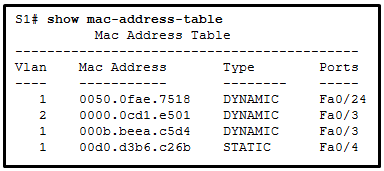
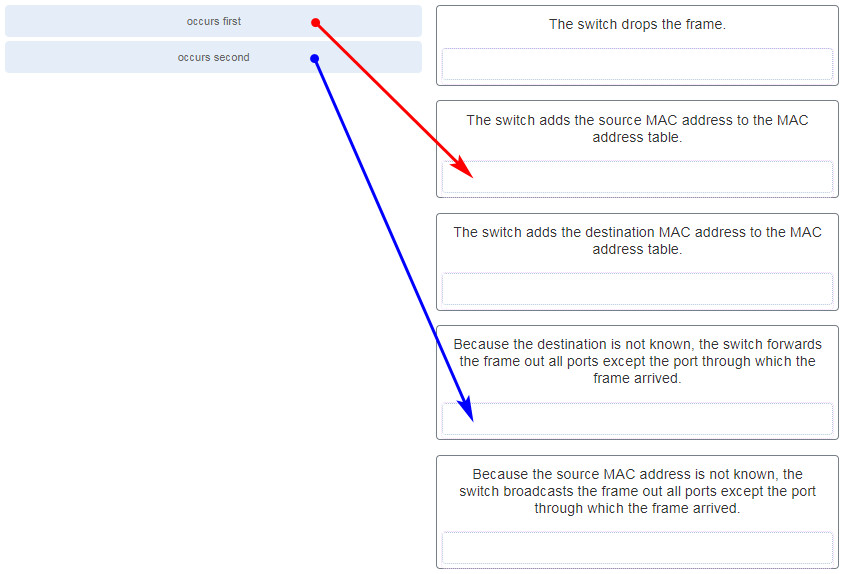
Explanation: Topic 2.1.3 – The switch checks source MAC (add if unknown), then destination MAC (forward if known, flood if unknown).
21. What information is added to the switch table from incoming frames?
Explanation: Topic 2.1.3 – A switch “learns” or builds the MAC address table based on the source MAC address as a frame comes into the switch. A switch forwards the frame onward based on the destination MAC address.
22. Which switching method ensures that the incoming frame is error-free before forwarding?
Explanation: Topic 2.1.6 – Two methods used by switches to transmit frames are store-and-forward and cut-through switching. The store-and-forward method performs error checking on the frame using the frame check sequence (FCS) value before sending the frame. In contrast, cut-through switching sends the frame as soon as the destination MAC address part of the header has been read and processed.
23. Refer to the exhibit. How many broadcast domains are displayed?
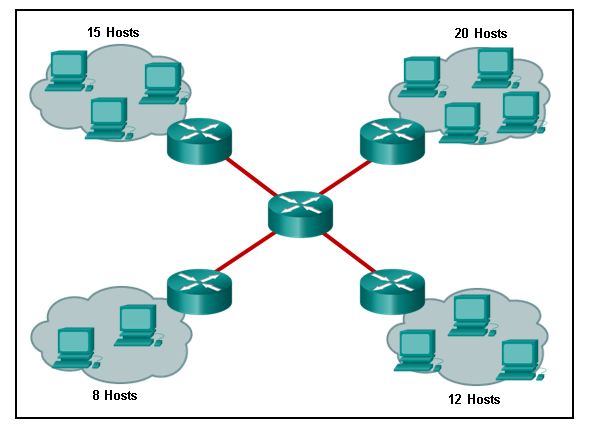
Explanation: Topic 2.2.2 – A router defines a broadcast boundary, so every link between two routers is a broadcast domain. In the exhibit, 4 links between routers make 4 broadcast domains. Also, each LAN that is connected to a router is a broadcast domain. The 4 LANs in the exhibit result in 4 more broadcast domains, so there are 8 broadcast domains in all.
24. Under which two occasions should an administrator disable DTP while managing a local area network? (Choose two.)
Explanation: Topic 3.5.1 – Cisco best practice recommends disabling DTP on links where trunking is not intended and when a Cisco switch is connected to a non-Cisco switch. DTP is required for dynamic trunk negotiation.
25. Which two characteristics describe the native VLAN? (Choose two.)
Explanation: Topic 3.2.5 – The native VLAN is assigned to 802.1Q trunks to provide a common identifier to both ends of the trunk link. Whatever VLAN native number is assigned to a port, or if the port is the default VLAN of 1, the port does not tag any frame in that VLAN as the traffic travels across the trunk. At the other end of the link, the receiving device that sees no tag knows the specific VLAN number because the receiving device must have the exact native VLAN number. The native VLAN should be an unused VLAN that is distinct from VLAN1, the default VLAN, as well as other VLANs. Data VLANs, also known as user VLANs, are configured to carry user-generated traffic, with the exception of high priority traffic, such as VoIP. Voice VLANs are configured for VoIP traffic. The management VLAN is configured to provide access to the management capabilities of a switch.
26. On a switch that is configured with multiple VLANs, which command will remove only VLAN 100 from the switch?
Explanation: Topic 3.3.10 – To remove all VLANs from a switch, the delete flash:vlan.dat command would be used. To change the assigned VLAN for an interface, the no switchport access vlan 100 interface configuration command would be used. To remove VLAN 100 as an allowed VLAN on a trunk, the no switchport trunk allowed vlan 100 would be used, but this would not remove the VLAN from the switch. To delete a single VLAN, such as VLAN 100, the no vlan 100 global configuration command would be used.
27. Refer to the exhibit. A network administrator is reviewing port and VLAN assignments on switch S2 and notices that interfaces Gi0/1 and Gi0/2 are not included in the output. Why would the interfaces be missing from the output?
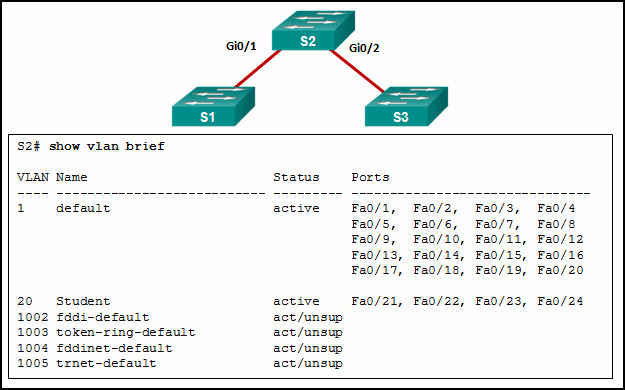
Explanation: Topic 3.3.8 – Interfaces that are configured as trunks do not belong to a VLAN and therefore will not show in the output of the show vlan brief commands.
28. A network contains multiple VLANs spanning multiple switches. What happens when a device in VLAN 20 sends a broadcast Ethernet frame?
Explanation: Topic 3.1.1 – VLANs create logical broadcast domains that can span multiple VLAN segments. Ethernet frames that are sent by a device on a specific VLAN can only be seen by other devices in the same VLAN.
29. Refer to the exhibit. All workstations are configured correctly in VLAN 20. Workstations that are connected to switch SW1 are not able to send traffic to workstations on SW2. What could be done to remedy the problem?
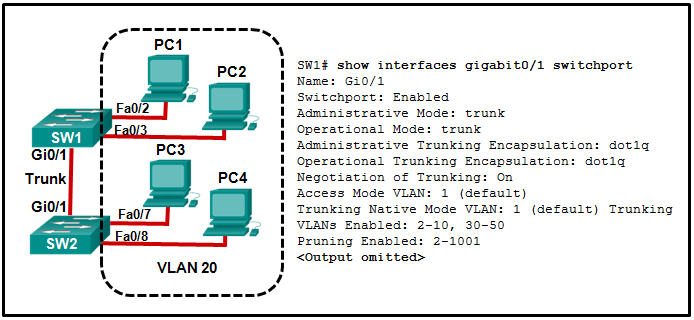
Explanation: Topic 3.4.1 – Enabling DTP on both switches simply allows negotiation of trunking. The “Negotiation of Trunking” line in the graphic shows that DTP is already enabled. The graphic also shows how the native VLAN is 1, and the default VLAN for any Cisco switch is 1. The graphic shows the PCs are to be in VLAN 20.
30. What happens to switch ports after the VLAN to which they are assigned is deleted?
Explanation: Topic 3.3.10 – Any ports that are not moved to an active VLAN cannot communicate with other hosts after the VLAN is deleted. They must be assigned to an active VLAN or their VLAN must be created.
31. Match the IEEE 802.1Q standard VLAN tag field with the description. (Not all options are used.)
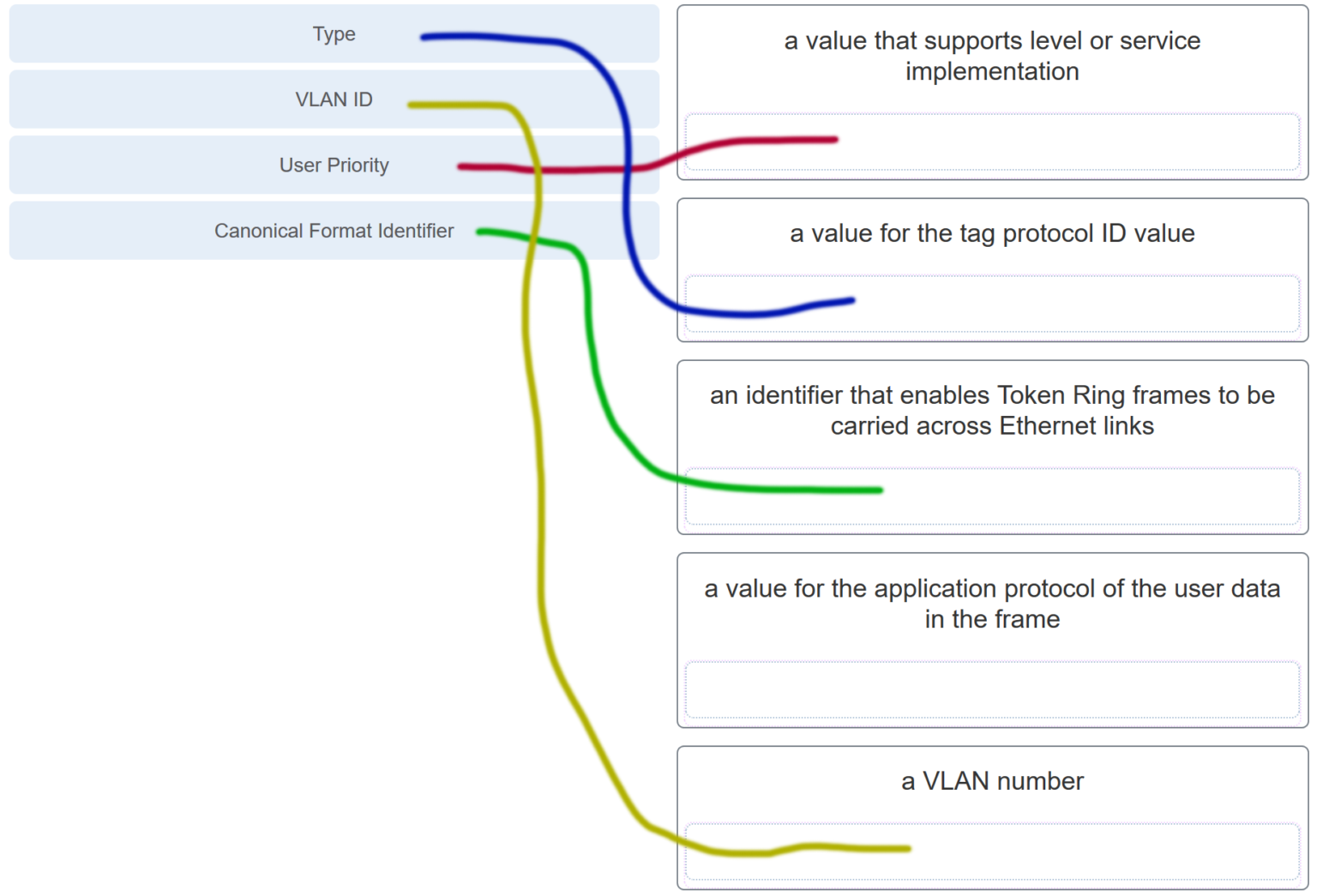
Explanation: Topic 3.2.4
- Type – Tag protocol ID (TPID)
- User priority – 3-bit priority
- Canonical Format Identifier (CFI) – 1-bit identifier
- VLAN ID (VID) – 12-bit VLAN number
32. Refer to the exhibit. In what switch mode should port G0/1 be assigned if Cisco best practices are being used?
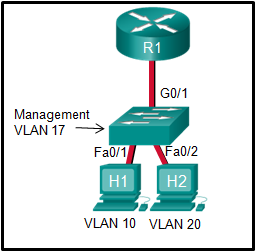
Explanation: Topic 3.4.1 – The router is used to route between the two VLANs, thus switch port G0/1 needs to be configured in trunk mode.
33. Match the DTP mode with its function. (Not all options are used.)
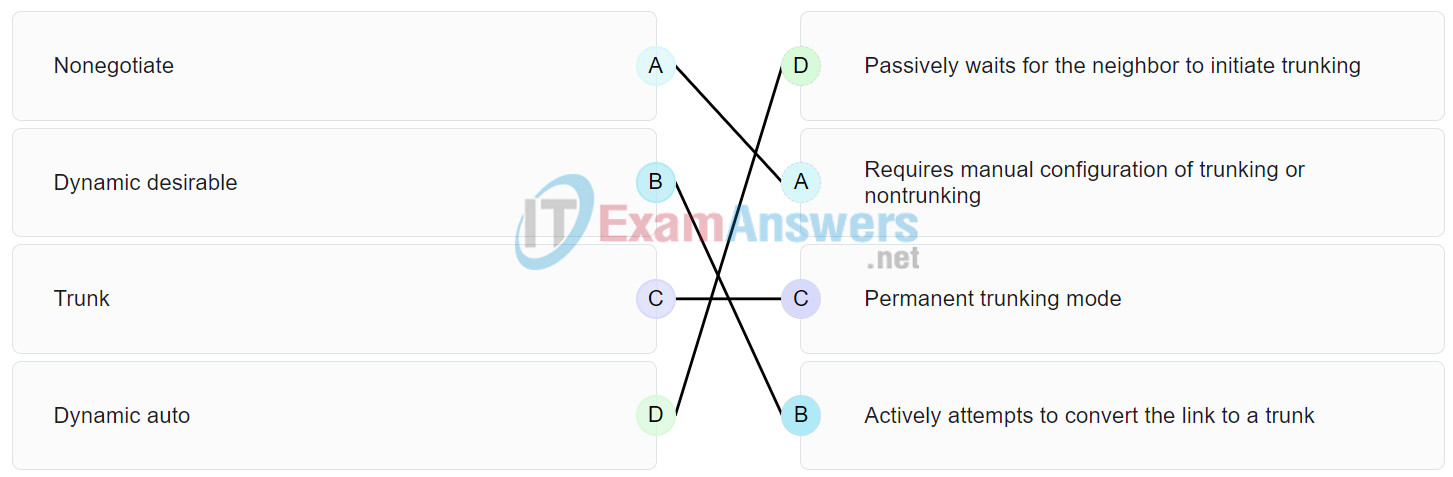
Explanation: Topic 3.5.2 – The dynamic auto mode makes the interface become a trunk interface if the neighboring interface is set to trunk or desirable mode. The dynamic desirable mode makes the interface actively attempt to convert the link to a trunk link. The trunk mode puts the interface into permanent trunking mode and negotiates to convert the neighboring link into a trunk link. The nonegotiate mode prevents the interface from generating DTP frames.
34. Port Fa0/11 on a switch is assigned to VLAN 30. If the command no switchport access vlan 30 is entered on the Fa0/11 interface, what will happen?
Explanation: Topic 3.3.9 – When the no switchport access vlan command is entered, the port is returned to the default VLAN 1. The port will remain active as a member of VLAN 1, and VLAN 30 will still be intact, even if no other ports are associated with it.
35. Which command displays the encapsulation type, the voice VLAN ID, and the access mode VLAN for the Fa0/1 interface?
Explanation: Topic 3.3.8 – The show interfaces switchport command displays the following information for a given port:
Switchport
Administrative Mode
Operational Mode
Administrative Trunking Encapsulation
Operational Trunking Encapsulation
Negotiation of Trunking
Access Mode VLAN
Trunking Native Mode VLAN
Administrative Native VLAN tagging
Voice VLAN
36. Refer to the exhibit. A technician is programming switch SW3 to manage voice and data traffic through port Fa0/20. What, if anything, is wrong with the configuration?
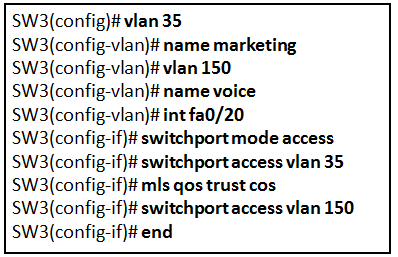
Explanation: Topic 3.3.6 – The voice VLAN should be configured with the switchport voice vlan 150 command. A switch interface can be configured to support one data VLAN and one voice VLAN. The mls qos trust cos associates with the interface. Voice traffic must be trusted so that fields within the voice packet can be used to classify it for QoS.
37. Which four steps are needed to configure a voice VLAN on a switch port? (Choose four).
Explanation: Topic 3.3.11 – To add an IP phone, the following commands should be added to the switch port:
SW3(config-vlan)# vlan 150
SW3(config-vlan)# name voice
SW3(config-vlan)# int fa0/20
SW3(config-if)# switchport mode access
SW3(config-if)# mls qos trust cos
SW3(config-if)# switchport access vlan 150
38. Refer to the exhibit. PC1 is unable to communicate with server 1. The network administrator issues the show interfaces trunk command to begin troubleshooting. What conclusion can be made based on the output of this command?
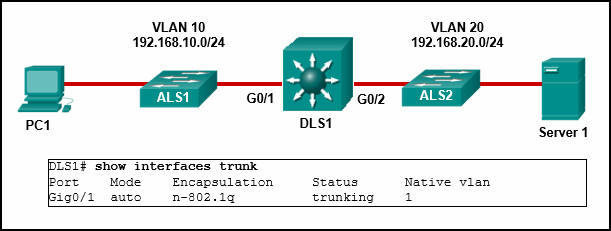
Explanation: Topic 4.4.4 – In the show interfaces trunk output, the G0/2 interface of DLS1 is not listed. This indicates the interface has probably not been configured as a trunk link. In the show interfaces trunk output, the G0/2 interface of DLS1 is not listed. This indicates the interface has probably not been configured as a trunk link.
39. Refer to the exhibit. What is the cause of the error that is displayed in the configuration of inter-VLAN routing on router CiscoVille?
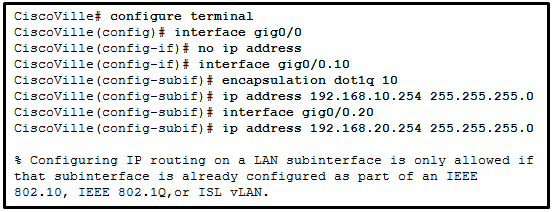
Explanation: Topic 4.2.4 – Subinterfaces need encapsulation dot1Q.
40. Refer to the exhibit. A network administrator has configured router CiscoVille with the above commands to provide inter-VLAN routing. What command will be required on a switch that is connected to the Gi0/0 interface on router CiscoVille to allow inter-VLAN routing?
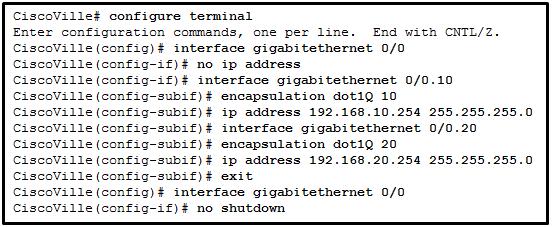
Explanation: Topic 4.2.2 – When they are configured for inter-VLAN routing, routers do not support the dynamic trunking protocol that is used by switches. For router-on-a-stick configurations to function, a connected switch must use the command switchport mode trunk.
41. A high school uses VLAN15 for the laboratory network and VLAN30 for the faculty network. What is required to enable communication between these two VLANs while using the router-on-a-stick approach?
Explanation: Topic 4.1.3 – With router-on-a-stick, inter-VLAN routing is performed by a router with a single router interface that is connected to a switch port configured with trunk mode. Multiple subinterfaces, each configured for a VLAN, can be configured under the single physical router interface. Switches can have ports that are assigned to different VLANs, but communication between those VLANs requires routing function from the router. A multilayer switch is not used in a router-on-a-stick approach to inter-VLAN routing.
42. When routing a large number of VLANs, what are two disadvantages of using the router-on-a-stick inter-VLAN routing method rather than the multilayer switch inter-VLAN routing method? (Choose two.)
Explanation: Topic 4.1.3 – With the router-on-a-stick inter-VLAN routing method, a dedicated router is required. It only needs one physical interface on the router to route traffic among multiple VLANs, by using subinterfaces on one physical interface. On the other hand, since traffic of all VLANs will have to go through the same physical interfaces, the throughput will be impacted. Also, a multilayer switch can use multiple SVIs to perform inter-VLAN routing.
43. Refer to the exhibit. A network administrator is verifying the configuration of inter-VLAN routing. Users complain that PCs on different VLANs cannot communicate. Based on the output, what are two configuration errors on switch interface Gi1/1? (Choose two.)
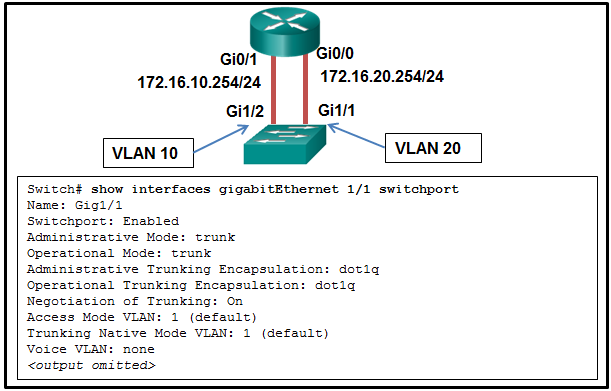
Explanation: Topic 4.4.4 – With legacy inter-VLAN routing methods, the switch ports that connect to the router should be configured as access mode and be assigned appropriate VLANs. In this scenario, the Gi1/1 interface should be in access mode with VLAN 10 assigned. The other options are default settings on the switch and have no effect on legacy inter-VLAN routing.
44. Refer to the exhibit. A network administrator is verifying the configuration of inter-VLAN routing. Users complain that PC2 cannot communicate with PC1. Based on the output, what is the possible cause of the problem?
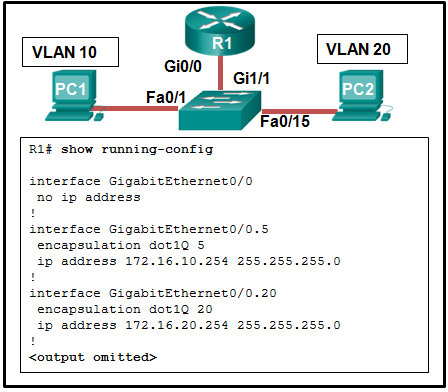
Explanation: Topic 4.4.6 – In router-on-a-stick, the subinterface configuration should match the VLAN number in the encapsulation command, in this case, the command encapsulation dot1Q 10 should be used for VLAN 10. Since subinterfaces are used, there is no need to configure IP on the physical interface Gi0/0. The trunk mode is configured on the switch port that connects to the router. The subinterfaces are turned on when they are added.
45. Refer to the exhibit. A network administrator has configured router CiscoVille with the above commands to provide inter-VLAN routing. What type of port will be required on a switch that is connected to Gi0/0 on router CiscoVille to allow inter-VLAN routing?
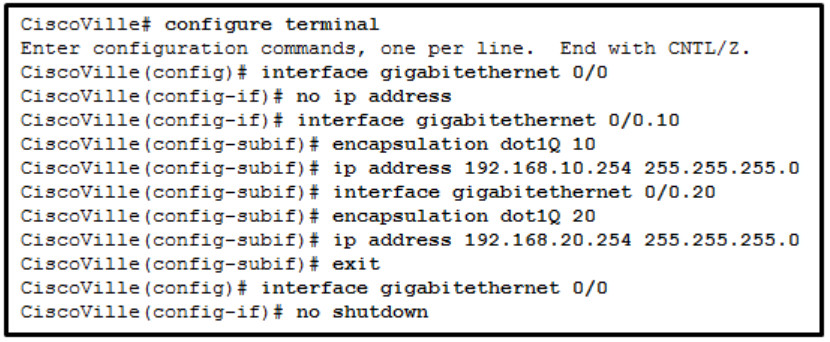
Explanation: Topic 4.2.2 – To allow a router-on-a-stick configuration to function, a switch must be connected to the router via a trunk port to carry the VLANs to be routed. An SVI would be used on a multilayer switch where the switch is performing inter-VLAN routing.
46. Refer to the exhibit. A network administrator is configuring RT1 for inter-VLAN routing. The switch is configured correctly and is functional. Host1, Host2, and Host3 cannot communicate with each other. Based on the router configuration, what is causing the problem?
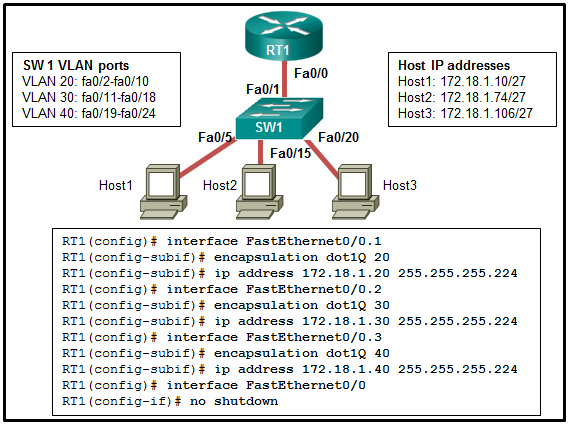
Explanation: Topic 4.4.6 – Since Host 1 (in VLAN 20) has the IP 172.18.1.10/27, the subinterface Fa0/0.1 should be configured with an IP address in the network 172.168.1.0/27. Similarly, Fa0/0.2 should be with an IP address in the network 172.168.1.64/27 and Fa0/0.3 should be with an IP address in the network 172.168.1.96/27.
47. Refer to the exhibit. A router-on-a-stick configuration was implemented for VLANs 15, 30, and 45, according to the show running-config command output. PCs on VLAN 45 that are using the 172.16.45.0 /24 network are having trouble connecting to PCs on VLAN 30 in the 172.16.30.0 /24 network. Which error is most likely causing this problem?
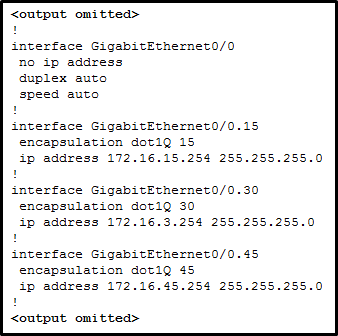
Explanation: Topic 4.4.6 – The subinterface GigabitEthernet 0/0.30 has an IP address that does not correspond to the VLAN addressing scheme. The physical interface GigabitEthernet 0/0 does not need an IP address for the subinterfaces to function. Subinterfaces do not require the no shutdown command.
48. What is a characteristic of a routed port on a Layer 3 switch?
Explanation: Topic 4.3.1 – A routed port on a Layer 3 switch is commonly used for connecting between distribution and core layer switches or between a Layer 3 switch and a router. This port does not get VLAN or trunking commands assigned to it. Instead, the port is programmed with an IP address. This is commonly used when static routing is configured on the switch or when a routing protocol is being run between the Layer 3 switch and the router or another Layer 3 switch.
49. Refer to the exhibit. A network administrator needs to configure router-on-a-stick for the networks that are shown. How many subinterfaces will have to be created on the router if each VLAN that is shown is to be routed and each VLAN has its own subinterface?
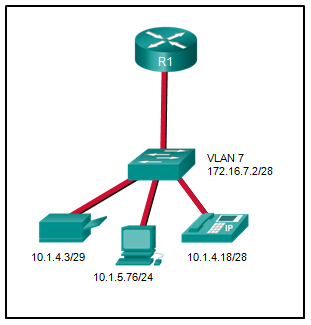
Explanation: Topic 4.2.4 – Based on the IP addresses and masks given, the PC, printer, IP phone, and switch management VLAN are all on different VLANs. This situation will require four subinterfaces on the router.
50. A technician is configuring a new Cisco 2960 switch. What is the effect of issuing the BranchSw(config-if)# mdix auto command?
Explanation: Topic 1.2.3 – mdix auto enables auto-MDIX.
51. A technician is configuring a new Cisco 2960 switch. What is the effect of issuing the BranchSw(config-if)# ip address 172.18.33.88 255.255.255.0 command?
Explanation: Topic 1.1.6 – This command assigns an IP to the SVI (virtual interface).
52. A technician is configuring a new Cisco 2960 switch. What is the effect of issuing the BranchSw# configure terminal command?
Explanation: Topic 1.1.6 – configure terminal enters global config mode.
53. A technician is configuring a new Cisco 2960 switch. What is the effect of issuing the BranchSw# configure terminal command?
Explanation: Topic 1.1.6 – configure terminal enters global config mode.
54. A technician is configuring a new Cisco 2960 switch. What is the effect of issuing the BranchSw(config-if)# shutdown command?
Explanation: Topic 1.2.6 – shutdown administratively disables the interface.
55. A technician is configuring a new Cisco 2960 switch. What is the effect of issuing the BranchSw(config-if)# shutdown command?
Explanation: Topic 1.2.6 – shutdown disables the interface.
56. A technician is configuring a new Cisco 2960 switch. What is the effect of issuing the BranchSw(config-if)# ipv6 address 2001:db8:a2b4:88::1/64 command?
Explanation: Topic 1.1.6 – This assigns an IPv6 address to the SVI.
57. A technician is configuring a new Cisco 2960 switch. What is the effect of issuing the BranchSw(config-if)# exit command?
Explanation: Topic 1.4.1 – exit moves one level up in the config hierarchy.
58. A technician is configuring a new Cisco 2960 switch. What is the effect of issuing the BranchSw> enable command?
Explanation: Topic 1.1.6 – enable enters privileged EXEC mode.
59. A technician is configuring a new Cisco 2960 switch. What is the effect of issuing the BranchSw(config-if)# duplex full command?
Explanation: Topic 1.2.1 – duplex full enables full-duplex operation.
60. What type of VLAN should not carry voice and network management traffic?
Explanation: Topic 3.1.3 – Data VLANs are for user traffic, not voice or management.
62. What type of VLAN is designed to reserve bandwidth to ensure IP Phone quality?
Explanation: Topic 3.2.6 – Voice VLAN is for VoIP traffic.
63. What type of VLAN is initially the management VLAN?
Explanation: Topic 3.1.3 – VLAN 1 is the default and management VLAN by default.
64. What type of VLAN is designed to have a delay of less than 150 ms across the network?
Explanation: Topic 3.1.3 – Voice VLANs have strict latency requirements.
65. What type of VLAN is used to separate the network into groups of users or devices?
Explanation: Topic 3.1.3 – Data VLANs separate user traffic.
66. What type of VLAN is configured specifically for network traffic such as SSH, Telnet, HTTPS, HTTP, and SNMP?
Explanation: Topic 3.1.3 – Management VLAN is for network management traffic.
68. What type of VLAN supports untagged traffic?
Explanation: Topic 3.2.5 – Native VLAN traffic is untagged on trunk links.
69. What type of VLAN supports untagged traffic?
Explanation: Topic 3.2.5 – Native VLAN traffic is untagged.
70. Refer to the exhibit. A network administrator has configured R1 as shown. When the administrator checks the status of the serial interface, the interface is shown as being administratively down. What additional command must be entered on the serial interface of R1 to bring the interface up?
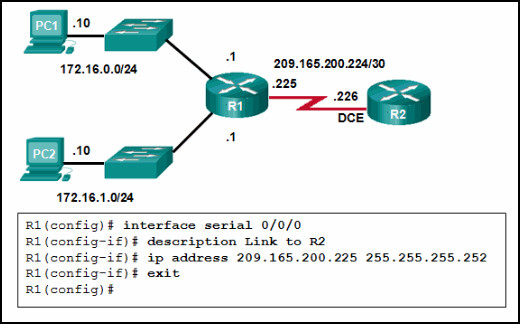
Explanation: Topic 1.4.4 – By default all router interfaces are shut down. To bring the interfaces up, an administrator must issue the no shutdown command in interface mode.
71. Refer to the exhibit. The network administrator wants to configure Switch1 to allow SSH connections and prohibit Telnet connections. How should the network administrator change the displayed configuration to satisfy the requirement?
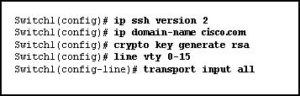
Explanation: Topic 1.3.4 – Change transport input telnet to transport input ssh.
72. Which solution would help a college alleviate network congestion due to collisions?
Explanation: Topic 2.2.3 – Switches provide microsegmentation so that one device does not compete for the same Ethernet network bandwidth with another network device, thus practically eliminating collisions. A high port density switch provides very fast connectivity for many devices.
73. Which two statements are correct with respect to SVI inter-VLAN routing? (Choose two.)
Explanation: Topic 4.1.4 – The SVI inter-VLAN routing method is faster than other methods. The switch can route the existing VLANs without the need for a router.
74. Refer to the exhibit. A network administrator is configuring inter-VLAN routing on a network. For now, only one VLAN is being used, but more will be added soon. What is the missing parameter that is shown as the highlighted question mark in the graphic?
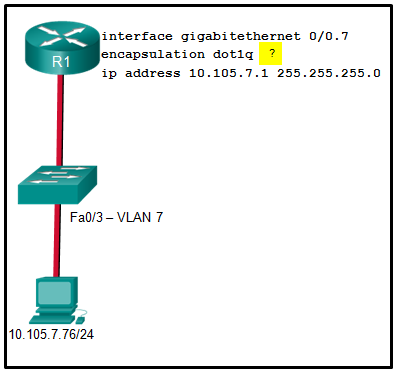
Explanation: Topic 4.2.4 – The completed command would be encapsulation dot1q 7. The encapsulation dot1q part of the command enables trunking and identifies the type of trunking to use. The 7 identifies the VLAN number.
75. Which type of VLAN is used to designate which traffic is untagged when crossing a trunk port?
Explanation: Topic 3.2.5 – A native VLAN is the VLAN that does not receive a VLAN tag in the IEEE 802.1Q frame header. Cisco best practices recommend the use of an unused VLAN (not a data VLAN, the default VLAN of VLAN 1, or the management VLAN) as the native VLAN whenever possible.
76. A network administrator issues the show vlan brief command while troubleshooting a user support ticket. What output will be displayed?
Explanation: Topic 3.3.8 – The show vlan brief command will provide information displaying the VLAN assignment and membership for all switch ports on a switch.
77. Open the PT Activity. Perform the tasks in the activity instructions and then answer the question. Which message is displayed when 10.10.10.1 is entered into the PC1 Web Browser address bar?
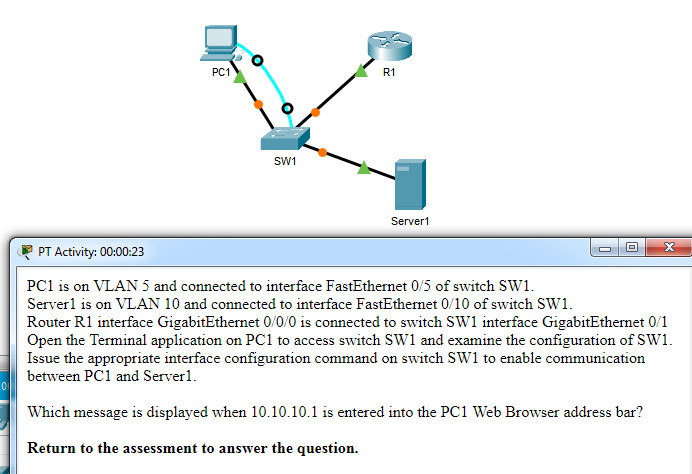

Explanation: Topic 4.2.2 – Examining the configuration of switch SW1 shows that interface Gi0/1 is not configured as a trunk. Issuing the interface configuration command switchport mode trunk on this interface will enable communications between PC1 and Server1.
78. Match each DHCP message type with its description. (Not all options are used.)
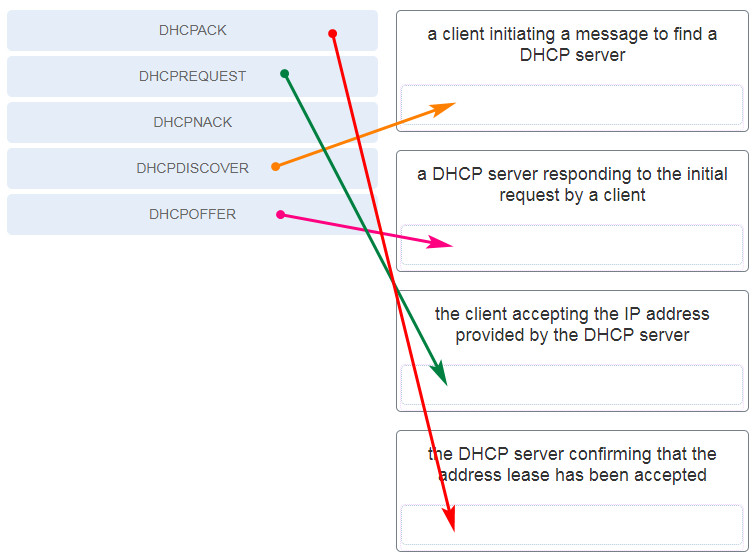
Explanation: Topic 7.1.2
- DHCPDISCOVER – client initiates
- DHCPOFFER – server offers
- DHCPREQUEST – client accepts
- DHCPACK – server confirms
79. What type of VLAN is configured specifically for network traffic such as SSH, Telnet, HTTPS, HTTP, and SNMP?
Explanation: Topic 3.1.3 – Management VLAN carries network management traffic.
🚀 Ace Your CCNA Exam - Complete Study Pack!
Get 500+ exam-realistic questions, Packet Tracer labs, and detailed explanations.
Understanding Switching Concepts, VLANs, and InterVLAN Routing (Modules 1-4)
Passing the CCNA 2 v7 Modules 1-4 exam requires a solid understanding of switching fundamentals, VLANs, trunking, and inter-VLAN routing. These modules cover basic device configuration, switching concepts, VLANs, trunking, and inter-VLAN routing – essential knowledge for any network administrator.
Why Modules 1-4 Matter for Your Networking Career
Modules 1-4 of CCNA 2 (SRWE) build on the fundamentals from CCNA 1. You learn how to configure switches, implement VLANs, manage trunks, and enable inter-VLAN routing. Employers expect CCNA-certified professionals to understand switch boot processes, MAC address tables, VLAN segmentation, and router-on-a-stick configurations. Mastering these topics prepares you for more advanced switching and routing topics like STP, EtherChannel, and OSPF.
Key Topics Covered in the Exam
Our verified answers address common exam questions on:
- Basic Device Configuration: Switch boot sequence, password recovery, SSH, command history, SVI configuration.
- Switching Concepts: MAC address table, switch forwarding methods (store-and-forward, cut-through), collision/broadcast domains.
- VLANs: VLAN types (data, voice, management, native, default), VLAN creation, assignment, and verification.
- Trunking: 802.1Q tagging, native VLAN, DTP modes, trunk configuration.
- Inter-VLAN Routing: Router-on-a-stick, subinterfaces, SVI routing, Layer 3 switching.
Many questions present a topology and ask you to identify correct trunk configuration, VLAN assignment, or routing method. Understanding the differences between router-on-a-stick and multilayer switching is critical.
Common Pitfalls to Avoid
Students often confuse native VLAN and default VLAN – native VLAN is used for untagged traffic on trunks, while default VLAN is VLAN 1. Another common mistake is forgetting to set the switchport mode trunk on a port connected to a router for inter-VLAN routing. Also, pay attention to DTP modes – dynamic auto and dynamic desirable have different behaviors.
When practicing with our answers, avoid memorizing letter choices. Focus on the concept behind each correct answer. For example, instead of remembering "option B is the correct trunk mode", learn when to use trunk vs. access mode.
Study Strategies That Work
To retain this material long-term, combine our exam answers with hands-on practice. Download Cisco Packet Tracer and build a topology with multiple switches, VLANs, and a router-on-a-stick. Configure trunking, assign VLANs, and verify inter-VLAN routing. Observe MAC address tables and DTP negotiation. This practical approach cements the theory from Modules 1-4.
We also recommend creating flashcards for key terms: CAM table, cut-through, store-and-forward, native VLAN, DTP, 802.1Q, subinterface, SVI. Quiz yourself daily until you can define each term without hesitation.
How to Use This Answer Page Effectively
Our goal at CoursMooc.com is to provide accurate, up-to-date answers for the latest CCNA v7 curriculum. For each question, we include an explanation—not just the correct choice. Read those explanations carefully. If you find a concept unclear, refer to the official Cisco NetAcad course materials or our additional tutorials linked below.
We regularly update this page to match any changes in the exam. If you notice discrepancies, please let us know through the comments. Your feedback helps other learners succeed.
What's Next After Modules 1-4?
After mastering switching concepts, Modules 5-6 cover redundant networks (STP, EtherChannel). Modules 7-9 focus on available and reliable networks (dynamic routing, FHRP). Modules 10-13 cover L2 security and WLANs. Modules 14-16 introduce routing concepts and configuration. Each step builds on the fundamentals you solidify here. By completing all CCNA 2 exams, you earn the official "Switching, Routing, and Wireless Essentials" badge – a stepping stone to the full CCNA certification.
Final Tips for Exam Day
Before starting the real exam:
- Get a good night's sleep – fatigue leads to misreading questions.
- Read each question twice. Some ask "Which two statements are correct?" – don't just pick one answer.
- Manage your time. You typically have 50-60 minutes for 40-50 questions. Skip difficult ones and return later.
- Look for keywords like "not", "except", or "only". One word changes the entire meaning.
- Trust your first instinct unless you find clear evidence you misread.
Remember: The CCNA v7 curriculum emphasizes practical troubleshooting. If you can explain why a trunk is down or why a host cannot ping across VLANs, you're ready. Use our answers to verify your thinking, then reinforce with simulation tools. Good luck on your exam – and on your journey to networking expertise.