CCNA 1 v7 Modules 4-7: Ethernet Concepts Exam Answers
Checkpoint Exam: Ethernet Concepts. This comprehensive study guide covers Modules 4-7 of the CCNA1 Introduction to Networks v7.0 (ITN), including Ethernet concepts, switching, MAC addressing, network media, and data link layer fundamentals.
1. What is the purpose of the OSI physical layer?
Explanation: Topic 4.1.1 – The OSI physical layer provides the means to transmit the bits that make up a frame across the network media.
2. Why are two strands of fiber used for a single fiber optic connection?
Explanation: Topic 4.5.4 – Two strands of fiber enable simultaneous transmission and reception (full-duplex).
3. Which characteristic describes crosstalk?
Explanation: Topic 4.3.1 – Crosstalk is interference caused by signal transmission on one wire interfering with another wire.
4. Which procedure is used to reduce the effect of crosstalk in copper cables?
Explanation: Topic 4.3.1 – Twisting wire pairs together helps cancel out electromagnetic interference and reduces crosstalk.
5. Match the situation with the appropriate use of network media.
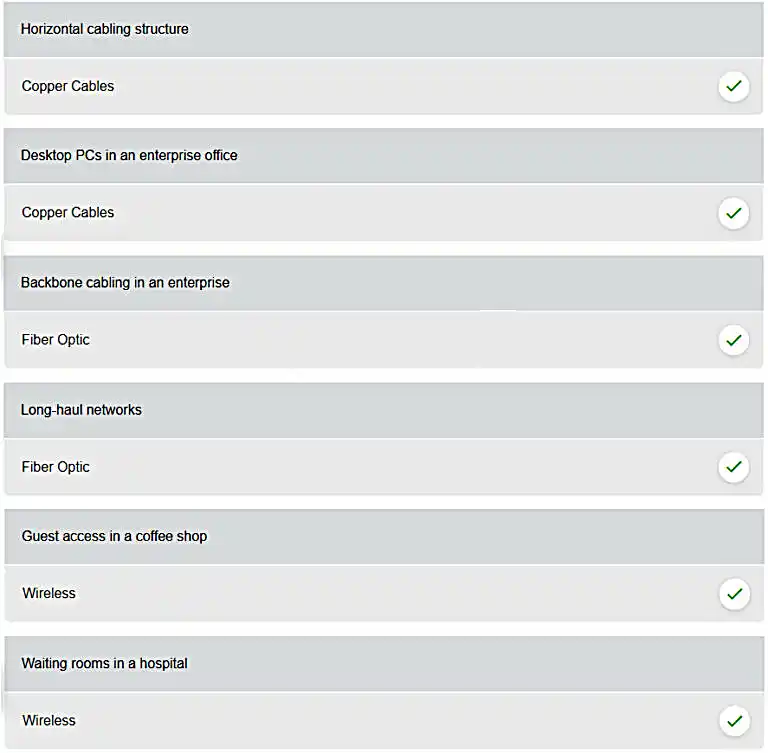
Explanation: Topic 4.3.3 – Copper cables: horizontal cabling, desktop PCs. Fiber optic: backbone cabling, long-haul networks. Wireless: guest access, waiting rooms.
6. A network administrator is measuring the transfer of bits across the company backbone for a mission critical financial application. The administrator notices that the network throughput appears lower than the bandwidth expected. Which three factors could influence the differences in throughput? (Choose three.)
Explanation: Topic 4.2.6 – Throughput usually does not match the specified bandwidth of physical links due to multiple factors. These factors include, the amount of traffic, type of traffic, and latency created by the network devices the data has to cross.
7. What are two characteristics of fiber-optic cable? (Choose two.)
Explanation: Topic 4.5.1 – Fiber-optic cable is immune to EMI/RFI and supports higher bandwidth, but is more expensive than UTP.
8. What is a primary role of the Physical layer in transmitting data on the network?
Explanation: Topic 4.1.2 – The OSI physical layer provides the means to transport the bits that make up a frame across the network media. This layer accepts a complete frame from the data link layer and encodes it as a series of signals that are transmitted to the local media.
9. With the use of unshielded twisted-pair copper wire in a network, what causes crosstalk within the cable pairs?
Explanation: Topic 4.3.1 – Crosstalk is a type of noise, or interference that occurs when signal transmission on one wire interferes with another wire. When current flows through a wire a magnetic field is produced. The produced magnetic field will interface the signal carried in the adjacent wire.
10. Refer to the graphic. What type of cabling is shown?
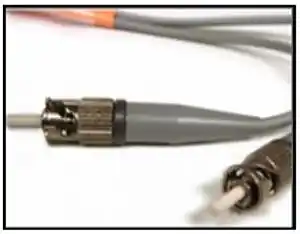
Explanation: Topic 4.5.1 – The graphic shows fiber-optic cable with its distinctive glass strands.
11. In addition to the cable length, what two factors could interfere with the communication carried over UTP cables? (Choose two.)
Explanation: Topic 4.3.1 – Copper media is widely used in network communications. However, copper media is limited by distance and signal interference. Data is transmitted on copper cables as electrical pulses. Copper media is susceptible to EMI/RFI and crosstalk.
12. Refer to the graphic. What type of cabling is shown?
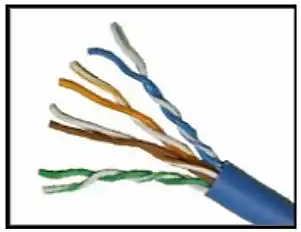
Explanation: Topic 4.3.3 – The graphic shows UTP cable with four pairs of twisted wires.
13. Which two devices commonly affect wireless networks? (Choose two.)
Explanation: Topic 4.6.1 – Cordless phones and microwaves operate on similar frequencies and can cause RFI.
14. Which two statements describe the services provided by the data link layer? (Choose two.)
Explanation: Topic 6.1.1 – The data link layer is divided into two sub layers, namely Logical Link Control (LLC) and Media Access Control (MAC). LLC forms a frame from the network layer PDU into a format that conforms to the requirements of the network interface and media. A network layer PDU might be for IPv4 or IPv6. The MAC sub layer defines the media access processes performed by the hardware. It manages the frame access to the network media according to the physical signaling requirements (copper cable, fiber optic, wireless, etc.)
15. What is the function of the CRC value that is found in the FCS field of a frame?
Explanation: Topic 6.3.2 – The CRC value in the FCS field of the received frame is compared to the computed CRC value of that frame, in order to verify the integrity of the frame. If the two values do not match, then the frame is discarded.
16. What is contained in the trailer of a data-link frame?
Explanation: Topic 6.3.2 – The trailer in a data-link frame contains error detection information that is pertinent to the frame included in the FCS field. The header contains control information, such as the addressing, while the area that is indicated by the word “data” includes the data, transport layer PDU, and the IP header.
17. Which statement describes a characteristic of the frame header fields of the data link layer?
Explanation: Topic 6.3.2 – All data link layer protocols encapsulate the Layer 3 PDU within the data field of the frame. However, the structure of the frame and the fields that are contained in the header vary according to the protocol. Different data link layer protocols may use different fields, like priority/quality of service, logical connection control, physical link control, flow control, and congestion control.
18. A network team is comparing physical WAN topologies for connecting remote sites to a headquarters building. Which topology provides high availability and connects some, but not all, remote sites?
Explanation: Topic 6.2.2 – Partial mesh topologies provide high availability by interconnecting multiple remote sites, but do not require a connection between all remote sites. A mesh topology requires point-to-point links with every system being connected to every other system. A point-to-point topology is where each device is connected to one other device. A hub and spoke uses a central device in a star topology that connects to other point-to-point devices.
19. Which two fields or features does Ethernet examine to determine if a received frame is passed to the data link layer or discarded by the NIC? (Choose two.)
Explanation: Topic 7.1.4 – An Ethernet frame is not processed and is discarded if it is smaller than the minimum (64 bytes) or if the calculated frame check sequence (FCS) value does not match the received FCS value. Auto-MDIX (automatic medium-dependent interface crossover) is Layer 1 technology that detects cable straight-through or crossover types. The source MAC address is not used to determine how the frame is received. CEF (Cisco Express Forwarding) is a technology used to expedite Layer 3 switching.
20. Which media communication type does not require media arbitration in the data link layer?
Explanation: Topic 6.2.5 – Full-duplex allows simultaneous transmit and receive, eliminating media arbitration.
21. Which statement describes an extended star topology?
Explanation: Topic 6.2.4 – Extended star interconnects multiple star topologies via central devices.
22. What is a characteristic of the LLC sublayer?
Explanation: Topic 6.1.2 – The LLC sublayer allows multiple Layer 3 protocols to use the same interface.
23. What are three ways that media access control is used in networking? (Choose three.)
Explanation: Topic 6.2.7 – Wired Ethernet networks use CSMA/CD for media access control. IEEE 802.11 wireless networks use CSMA/CA, a similar method. Media access control defines the way data frames get placed on the media. The controlled access method is deterministic, not a contention-based access to networks. Because each device has its own time to use the medium, controlled access networks such as legacy Token Ring do not have collisions.
24. During the encapsulation process, what occurs at the data link layer for a PC connected to an Ethernet network?
Explanation: Topic 6.3.3 – The data link layer adds source and destination MAC (physical) addresses.
25. What three items are contained in an Ethernet header and trailer? (Choose three.)
Explanation: Topic 6.3.2 – Ethernet headers contain source/destination MAC; the trailer contains error-checking (FCS).
26. What type of communication rule would best describe CSMA/CD?
Explanation: Topic 6.2.6 – Carrier sense multiple access collision detection (CSMA/CD) is the access method used with Ethernet. The access method rule of communication dictates how a network device is able to place a signal on the carrier. CSMA/CD dictates those rules on an Ethernet network and CSMA/CA dictates those rules on an 802.11 wireless LAN.
27. Which three basic parts are common to all frame types supported by the data link layer? (Choose three.)
Explanation: Topic 6.3.1 – Every frame has a header, data, and trailer.
28. Which statement is true about the CSMA/CD access method that is used in Ethernet?
Explanation: Topic 6.2.7 – CSMA/CD requires devices to listen before transmitting to avoid collisions.
29. What is the auto-MDIX feature on a switch?
Explanation: Topic 7.4.5 – Auto-MDIX detects cable type and configures the interface accordingly.
30. Refer to the exhibit. What is the destination MAC address of the Ethernet frame as it leaves the web server if the final destination is PC1?
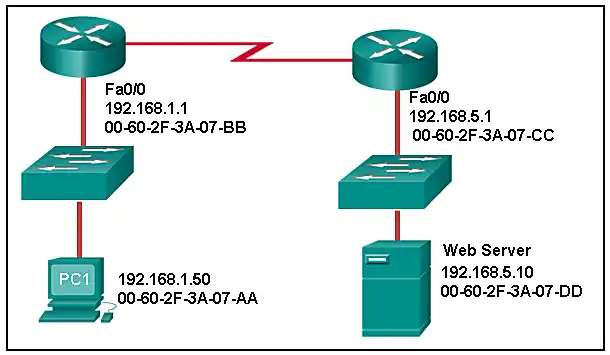
Explanation: Topic 7.3.5 – The destination MAC address changes at each hop; the web server uses the default gateway MAC.
31. A Layer 2 switch is used to switch incoming frames from a 1000BASE-T port to a port connected to a 100Base-T network. Which method of memory buffering would work best for this task?
Explanation: Topic 7.4.3 – Shared memory buffering is effective for asymmetric switching between different port speeds.
32. What are two examples of the cut-through switching method? (Choose two.)
Explanation: Topic 7.4.2 – Store-and forward switching accepts the entire frame and performs error checking using CRC before forwarding the frame. Store-and-forward is often required for QOS analysis. Fast-forward and fragment-free are both variations of the cut-through switching method where only part of the frame is received before the switch begins to forward it.
33. Which frame forwarding method receives the entire frame and performs a CRC check to detect errors before forwarding the frame?
Explanation: Topic 7.4.1 – Store-and-forward checks the entire frame using CRC before forwarding.
34. What is the purpose of the FCS field in a frame?
Explanation: Topic 7.1.4 – The FCS field in a frame is used to detect any errors in the transmission and receipt of a frame. This is done by comparing the CRC value within the frame against a computed CRC value of the frame. If the two values do not match, then the frame is discarded.
35. Which switching method has the lowest level of latency?
Explanation: Topic 7.4.2 – Fast-forward begins forwarding after reading the destination MAC address, providing the lowest latency.
36. A network administrator is connecting two modern switches using a straight-through cable. The switches are new and have never been configured. Which three statements are correct about the final result of the connection? (Choose three.)
Explanation: Topic 7.4.4 – Modern switches negotiate speed, full-duplex, and auto-MDIX eliminates the need for crossover.
37. Which advantage does the store-and-forward switching method have compared with the cut-through switching method?
Explanation: Topic 7.4.1 – A switch using the store-and-forward switching method performs an error check on an incoming frame by comparing the FCS value against its own FCS calculations after the entire frame is received. In comparison, a switch using the cut-through switching method makes quick forwarding decisions and starts the forwarding process without waiting for the entire frame to be received. Thus a switch using cut-through switching may send invalid frames to the network. The performance of store-and-forward switching is slower compared to cut-through switching performance. Collision detection is monitored by the sending device. Store-and-forward switching does not use IPv4 Layer 3 and 4 information for its forwarding decisions.
38. When the store-and-forward method of switching is in use, what part of the Ethernet frame is used to perform an error check?
Explanation: Topic 7.4.1 – The cyclic redundancy check (CRC) part of the trailer is used to determine if the frame has been modified during transit. If the integrity of the frame is verified, the frame is forwarded. If the integrity of the frame cannot be verified, then the frame is dropped.
39. Which switching method uses the CRC value in a frame?
Explanation: Topic 7.4.1 – When the store-and-forward switching method is used, the switch receives the complete frame before forwarding it on to the destination. The cyclic redundancy check (CRC) part of the trailer is used to determine if the frame has been modified during transit. In contrast, a cut-through switch forwards the frame once the destination Layer 2 address is read. Two types of cut-through switching methods are fast-forward and fragment-free.
40. What are two actions performed by a Cisco switch? (Choose two.)
Explanation: Topic 7.3.2 – Switches build MAC tables using source MAC addresses and forward using destination MAC addresses.
41. Which two statements describe features or functions of the logical link control sublayer in Ethernet standards? (Choose two.)
Explanation: Topic 7.1.2 – Logical link control is implemented in software and enables the data link layer to communicate with the upper layers of the protocol suite. Logical link control is specified in the IEEE 802.2 standard. IEEE 802.3 is a suite of standards that define the different Ethernet types. The MAC (Media Access Control) sublayer is responsible for the placement and retrieval of frames on and off the media. The MAC sublayer is also responsible for adding a header and a trailer to the network layer protocol data unit (PDU).
42. What is the auto-MDIX feature?
Explanation: Topic 7.4.5 – The auto-MDIX feature allows the device to configure its network port according to the cable type that is used (straight-through or crossover) and the type of device that is connected to that port. When a port of a switch is configured with auto-MDIX, this switch can be connected to another switch by the use of either a straight-through cable or a crossover cable.
43. What is one advantage of using the cut-through switching method instead of the store-and-forward switching method?
Explanation: Topic 7.4.2 – Cut-through switching provides lower latency switching for high-performance computing (HPC) applications. Cut-through switching allows more invalid frames to cross the network than store-and-forward switching. The cut-through switching method can make a forwarding decision as soon as it looks up the destination MAC address of the frame.
44. Which is a multicast MAC address?
Explanation: Topic 7.2.6 – Multicast MAC addresses begin with 01-00-5E.
45. Refer to the exhibit. What is wrong with the displayed termination?
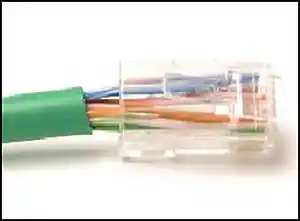
Explanation: Topic 4.4.2 – When a cable to an RJ-45 connector is terminated, it is important to ensure that the untwisted wires are not too long and that the flexible plastic sheath surrounding the wires is crimped down and not the bare wires. None of the colored wires should be visible from the bottom of the jack.
46. Refer to the exhibit. The PC is connected to the console port of the switch. All the other connections are made through FastEthernet links. Which types of UTP cables can be used to connect the devices?
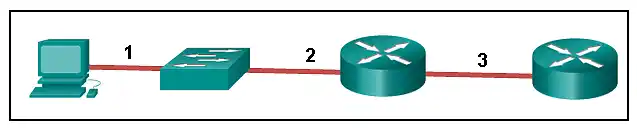
Explanation: Topic 4.4.3 – A straight-through cable is commonly used to interconnect a host to a switch and a switch to a router. A crossover cable is used to interconnect similar devices together like switch to a switch, a host to a host, or a router to a router. If a switch has the MDIX capability, a crossover could be used to connect the switch to the router; however, that option is not available. A rollover cable is used to connect to a router or switch console port.
47. Open the PT Activity. Perform the tasks in the activity instructions and then answer the question. Which port does Switch0 use to send frames to the host with the IPv4 address 10.1.1.5?
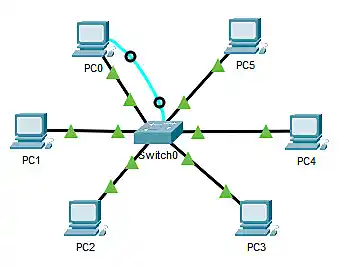

Explanation: Topic 7.3.2 – Issuing the command ipconfig /all from the PC0 command prompt displays the IPv4 address and MAC address. When the IPv4 address 10.1.1.5 is pinged from PC0, the switch stores the source MAC address (from PC0) along with the port to which PC0 is connected. When the destination reply is received, the switch takes the destination MAC address and compares to MAC addresses stored in the MAC address table. Issuing the show mac-address-table on the PC0 Terminal application displays two dynamic MAC address entries. The MAC address and port entry that does not belong to PC0 must be the MAC address and port of the destination with the IPv4 address 10.1.1.5.
48. What does the term "attenuation" mean in data communication?
Explanation: Topic 4.3.1 – Data is transmitted on copper cables as electrical pulses. A detector in the network interface of a destination device must receive a signal that can be successfully decoded to match the signal sent. However, the farther the signal travels, the more it deteriorates. This is referred to as signal attenuation.
49. What makes fiber preferable to copper cabling for interconnecting buildings? (Choose three.)
Explanation: Topic 4.5.1 – Optical fiber cable transmits data over longer distances and at higher bandwidths than any other networking media. Unlike copper wires, fiber-optic cable can transmit signals with less attenuation and is completely immune to EMI and RFI.
50. What OSI physical layer term describes the process by which one wave modifies another wave?
Explanation: Topic 4.2.4 – Modulation is the process of modifying one wave with another.
51. What OSI physical layer term describes the capacity at which a medium can carry data?
Explanation: Topic 4.2.5 – Bandwidth is the capacity of a medium to carry data.
53. What OSI physical layer term describes the measure of the transfer of bits across a medium over a given period of time?
Explanation: Topic 4.2.6 – Throughput measures the actual transfer of bits over time.
54. What OSI physical layer term describes the amount of time, including delays, for data to travel from one point to another?
Explanation: Topic 4.2.6 – Latency is the delay for data to travel from source to destination.
56. What OSI physical layer term describes the measure of usable data transferred over a given period of time?
Explanation: Topic 4.2.6 – Goodput measures usable data transferred, excluding overhead.
57. What OSI physical layer term describes the physical medium which uses electrical pulses?
Explanation: Topic 4.3.1 – Copper cable transmits data using electrical pulses.
58. What OSI physical layer term describes the physical medium that uses the propagation of light?
Explanation: Topic 4.2.4 – Fiber-optic cable uses light propagation.
59. What OSI physical layer term describes the physical medium for microwave transmissions?
Explanation: Topic 4.2.4 – Microwave transmissions use air as the physical medium.
60. Which two functions are performed at the MAC sublayer of the OSI data link layer? (Choose two.)
Explanation: Topic 6.1.2 – The MAC sublayer controls the NIC and provides shared medium access.
61. Which two functions are performed at the LLC sublayer of the OSI data link layer? (Choose two.)
Explanation: Topic 6.1.2 – LLC enables multiple Layer 3 protocols and identifies the protocol in the frame.
64. Which two functions are performed at the LLC sublayer of the OSI data link layer? (Choose two.)
Explanation: Topic 6.1.2 – LLC adds control info and identifies the network layer protocol.
66. Which two functions are performed at the LLC sublayer of the OSI data link layer? (Choose two.)
Explanation: Topic 6.1.2 – LLC adds control info and enables multiple Layer 3 protocols.
68. Which two functions are performed at the LLC sublayer of the OSI data link layer? (Choose two.)
Explanation: Topic 6.1.2 – LLC enables multiple protocols and adds control information.
71. What action will occur if a switch receives a frame with the destination MAC address FF:FF:FF:FF:FF:FF?
Explanation: Topic 7.2.5 – FF:FF:FF:FF:FF:FF is a broadcast MAC; the switch floods it to all ports except the ingress port.
73. What action will occur if a switch receives a frame with the destination MAC address 01:00:5E:00:00:D9?
Explanation: Topic 7.2.6 – 01:00:5E is a multicast MAC; the switch floods it to all ports except the ingress port.
74. What action will occur if a host receives a frame with a destination MAC address of FF:FF:FF:FF:FF:FF?
Explanation: Topic 7.2.5 – A host processes broadcast frames (destined to FF:FF:FF:FF:FF:FF).
75. What action will occur if a switch receives a frame and does have the source MAC address in the MAC table?
Explanation: Topic 7.3.2 – The switch refreshes the aging timer for the existing MAC table entry.
76. What action will occur if a host receives a frame with a destination MAC address of FF:FF:FF:FF:FF:FF?
Explanation: Topic 7.2.5 – Hosts process broadcast frames.
78. What action will occur if a host receives a frame with a destination MAC address it does not recognize?
Explanation: Topic 7.2.3 – Hosts discard frames with unrecognized destination MAC addresses.
79. Which type of UTP cable is used to connect a PC to a switch port?
Explanation: Topic 4.4.3 – A rollover cable is a Cisco proprietary cable used to connect to a router or switch console port. A straight-through (also called patch) cable is usually used to interconnect a host to a switch and a switch to a router. A crossover cable is used to interconnect similar devices together, for example, between two switches, two routers, and two hosts.
🚀 Ace Your CCNA Exam - Complete Study Pack!
Get 500+ exam-realistic questions, Packet Tracer labs, and detailed explanations.
Understanding Ethernet Concepts (Modules 4-7)
Passing the CCNA 1 v7 Modules 4-7 exam requires a solid understanding of Ethernet fundamentals, switching, and network media. These modules cover the OSI physical and data link layers, Ethernet frame structure, MAC addressing, switching methods, and cabling – essential knowledge for any network technician.
Why Modules 4-7 Matter for Your Networking Career
Modules 4-7 build on the basic connectivity concepts from the first three modules. You learn how Ethernet works at the physical and data link layers, how switches forward frames, and how to choose the right cabling for different scenarios. Employers expect CCNA-certified professionals to understand collision domains, broadcast domains, MAC address tables, and switching logic. Mastering these topics prepares you for routing, network security, and automation later in the curriculum.
Key Topics Covered in the Exam
Our verified answers address common exam questions on:
- Physical Layer Concepts: Bandwidth, throughput, latency, goodput, and signal encoding.
- Cabling and Media: UTP, fiber-optic, coaxial, wireless; crosstalk, attenuation, EMI/RFI.
- Data Link Layer: LLC and MAC sublayers, frame structure, error detection (FCS/CRC).
- Ethernet Switching: Store-and-forward vs. cut-through, fast-forward, fragment-free.
- MAC Addressing: Unicast, broadcast, multicast; MAC address table operations.
- Topologies and Media Access: CSMA/CD, full-duplex, half-duplex, extended star.
Many questions present a network topology and ask you to identify the correct cable type, switching method, or MAC address behavior. Understanding encapsulation and the role of each frame field is critical for success.
Common Pitfalls to Avoid
Students often confuse store-and-forward with cut-through switching. Remember: store-and-forward checks the entire frame (CRC) before forwarding, while cut-through forwards as soon as the destination MAC is read. Another frequent mistake is mixing up cable types – straight-through connects unlike devices (PC to switch), crossover connects like devices (switch to switch, PC to PC). Also, pay attention to MAC address formats: multicast begins with 01-00-5E, broadcast is FF-FF-FF-FF-FF-FF.
When practicing with our answers, avoid memorizing letter choices (A, B, C, D). Cisco often reorders options. Focus on the concept behind each correct answer. For example, instead of remembering "option B is the correct switching method", learn why cut-through has lower latency.
Study Strategies That Work
To retain this material long-term, combine our exam answers with hands-on practice. Download Cisco Packet Tracer and build a simple LAN with multiple switches and PCs. Observe the MAC address table as you ping between devices. Experiment with different cable types and switching methods. This practical approach cements the theory from Modules 4-7.
We also recommend creating flashcards for key terms: CSMA/CD, FCS, CRC, auto-MDIX, MAC address table, broadcast domain, collision domain, and the difference between store-and-forward and cut-through. Quiz yourself daily until you can define each term without hesitation.
How to Use This Answer Page Effectively
Our goal at CoursMooc.com is to provide accurate, up-to-date answers for the latest CCNA v7 curriculum. For each question, we include an explanation—not just the correct choice. Read those explanations carefully. If you find a concept unclear, refer to the official Cisco NetAcad course materials or our additional tutorials linked below.
We regularly update this page to match any changes in the exam. If you notice discrepancies, please let us know through the comments. Your feedback helps other learners succeed.
What's Next After Modules 4-7?
After mastering Ethernet concepts, Modules 8-10 cover communicating between networks (routing, IP addressing). Modules 11-13 dive deeper into IP addressing and subnetting. Modules 14-15 cover network application communications, and Modules 16-17 focus on building and securing a small network. Each step builds on the fundamentals you solidify here. By completing all three CCNA 1 v7 exams (Modules 1-3, 4-7, 8-10, and 11-13), you earn the official "Introduction to Networks" badge – a stepping stone to the full CCNA certification.
Final Tips for Exam Day
Before starting the real exam:
- Get a good night's sleep – fatigue leads to misreading questions.
- Read each question twice. Some ask "Which two statements are correct?" – don't just pick one answer.
- Manage your time. You typically have 50-60 minutes for 40-50 questions. Skip difficult ones and return later.
- Look for keywords like "not", "except", or "only". One word changes the entire meaning.
- Trust your first instinct unless you find clear evidence you misread.
Remember: The CCNA v7 curriculum emphasizes practical troubleshooting. If you can explain why a frame is dropped or why a particular cable type is used, you're ready. Use our answers to verify your thinking, then reinforce with simulation tools. Good luck on your exam – and on your journey to networking expertise.